Free voice to text that types where you are
Dictation software has spent twenty years being sold by the month. It does not have to be, and the
reason is simple: the speech model that turns your voice into words is a file on your disk, and
running it costs whoever wrote the software nothing at all. Deixis charges nothing for it. Hold
Ctrl+Win, say the sentence, let go, and clean punctuated text is typed into whatever field your
cursor was already in — your editor, your terminal, a ticket, a chat window — with your clipboard
put back the way you left it.
There is no account. Deixis does not ask you to sign in to dictate, and it never will: the recognition is in-process on your machine, so there is nothing for a server to check and nothing for it to meter. It works with the network unplugged, on a plane, on a machine that has no route to the internet at all.
What you are downloading
This is Deixis, a desktop app for Windows.
The tool on this page is one feature of it, not a separate download. The Download button hands you a signed Windows installer, Deixis_<version>_x64-setup.exe, published by Dappit — Windows names the publisher before it runs. There is no bundled extra software, no toolbar and no second installer. Deixis needs no account to install and none of what this page calls free is behind a sign-up. What it runs on.
Why it is free, and when it is not
If it happens on your computer, it is free. If it needs our model, it is not.
That is the whole rule, and it is the reason none of this is a limited free tier waiting to run out. Speech recognition is a file on your own disk doing work on your own processor: it costs us nothing to let you run it, so we do not charge for it and there is nothing to meter. The only features that cost anything are the ones where a language model has to answer — and even those are free if the model is yours.
| What it is | What it costs |
|---|---|
| Everything that runs on your machineDictation, free mode, the dictionary and packs, screen grabs and annotation, screen recording, meeting recording and on-device transcription, history and export, custom buttons, webhooks to your own URLs. | Free, forever. No account, no trial clock, nothing metered. |
| The three things that need a language modelCleaning up an utterance with a model rather than with rules, translating a selection, and writing up a meeting into notes. A model runs on hardware somebody pays for — yours, or ours. | Free with a model of your own: a local one, or your own provider key. Otherwise Deixis Pro, $49 a year or $10 a month — or a seat, where your team pays instead. |
| Sharing a linkUploading a grab, a note or a screen recording so somebody else can open it as a URL, with an expiry of 1 to 90 days and revocable at any time. | Needs a Deixis account, and is part of the same paid tier. It is storage and bandwidth on our side. |
A subscription buys convenience, not capability: every paid row above is open to anyone with their own provider key, free, forever. The seven-day trial covers only the paid row, is opt-in, and needs no card. The full version is in the docs.
What you get
More than dictation. One key, and everything behind it.
Hold the key and press a letter: free mode, a grab, a meeting, a recording, a translation, your own buttons. All of it on your own device, all of it free, none of it behind an account.

Dictation, where your cursor is
Hold a key, speak, release. Clean, punctuated text lands in whatever has focus, on your PC, your Mac and your phone, with your clipboard handed back.

Free mode: talk and point
Narrate for as long as you like while you grab a region, pick a button on screen or take a selection. One note, what you said interleaved with what you pointed at, pasted where you finish and saved as Markdown.

Screen grabs, annotated
Freeze every screen at the keypress, drag a region, add arrows, boxes, text and numbered steps, and pixelate what is private. Saved as a PNG that stays editable.

Screen recording, shared as a link
Record the screen with your narration. The recording writes itself up with a title, chapters and a summary, and from your Deixis account it shares as a link anyone can open without one. The Loom you can stop paying for.

Meetings, no bot, names included
Your microphone and the other side, transcribed on your machine while the call runs. Deixis tells the voices apart and remembers the ones you name, and never uploads a voice.

Your own buttons and workflows
Add a button to the palette: it gets the note on stdin and types back whatever it prints. Send finished notes to any URL you own. Chain steps: read the text off a screenshot, translate it, summarise it, post it.
Free voice to text that types where you are
What free covers
Everything that runs on your own computer, which is most of the product:
- All dictation, at any length, in any application that takes text.
- Free mode — double-tap the chord and it keeps listening, so you can narrate a paragraph you have not finished thinking, and collect grabs and selections while you talk.
- Your vocabulary. A dictionary of terms the recogniser should know, post-recognition fixes applied at word boundaries, filler words to strip, and five vocabulary packs that ship with the app plus any you write yourself.
- Both speech models, downloaded once on first run.
- History and export, screen grabs and annotation, screen recording, meeting recording and transcription, custom buttons, and webhooks to your own URLs.
No trial clock runs on any of that, and nothing in the list stops working when a trial ends, because none of it ever started one.
The three things that can cost money, and why
Three features need a language model to answer, and a language model is either on your machine or on somebody's server. They are: cleaning up an utterance with a model rather than with rules, translating a selection, and writing up a meeting into notes.
All three are free with your own provider key — set one environment variable and the request carries your key, billed to you, with nothing stored on our side. That is a supported path, not a loophole.
Pro is the managed version of exactly those three: $49 a year, or $10 a month, and we run the inference so there is no key to obtain. A subscription buys convenience, not capability, and the seven-day trial covers only the cloud extras — you start it yourself, from your account page, with an emailed six-digit code and no card.
Why it types better than the free thing you already have
Windows has voice typing built in, and it is free too. The difference is not the recognition, it is what happens to the sentence afterwards.
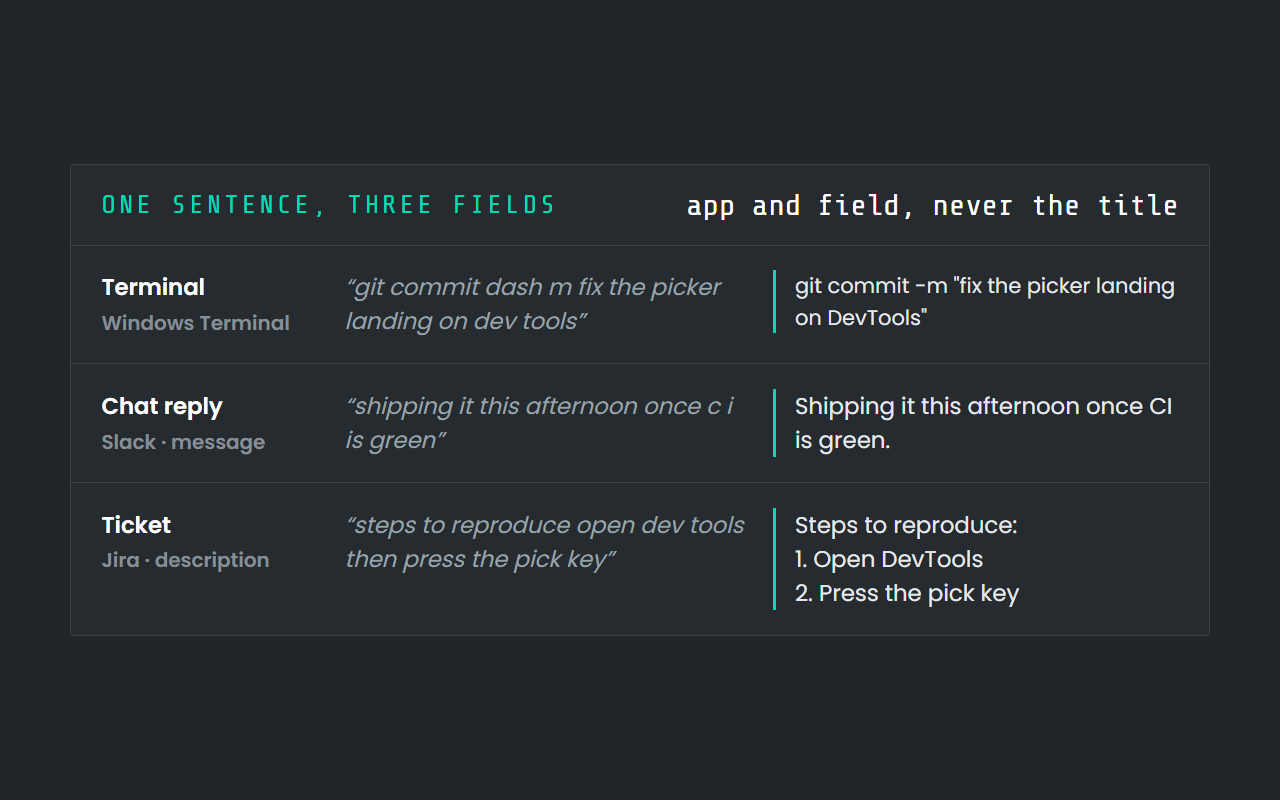
It knows what you are typing into. A commit message, a chat reply, a ticket and a terminal want different punctuation and different capitalisation, and Deixis knows which app and which field the text is going into, so it cleans up accordingly. Nothing about the window's title is used for that — the app name and the field name ride along, the title does not.
It knows your words. The vocabulary list teaches the recogniser the proper nouns you actually say all day, and the fix list repairs the ones it keeps mangling, at word boundaries, in the order you wrote them.
It is the same tool everywhere. One chord, in every application, rather than a dictation box you paste out of. The same product runs on Windows, on a Mac, and as a keyboard on your phone.
| Tool | Recognition runs | Price |
|---|---|---|
| 1Deixis | On your own device, inside the app, on every platform. Your audio never leaves it.Windows 10 and 11 (64-bit, on a CPU with AVX2: 2013 and later), Mac (Apple Silicon) and Android (a dictation bubble in any app, plus meetings), with an iPhone keyboard in beta on TestFlight and not yet in the App Store. One engine on all of them, and dictation audio never leaves the device. | Free forever for everything local, meetings included. Pro is $49 a year for the cloud extras with nothing to set up. |
| Aqua Voice | In the cloudmacOS, Windows, iOS | Free tier: 1,000 words on the Starter plan, no card; the Windows page calls that about seven minutes of talking; $10 a month; $96 a yearchecked 2026-09-05 |
| Dragon Professional | On your deviceWindows 10 and 11, Windows Server 2016, 2019 and 2022 | No published price: sold through a Contact us button; no price on nuance.com, and the old online store address now redirects to the Dragon sitechecked 2026-09-05 |
| MacWhisper | On your device or in the cloud, your choicemacOS | Free tier: a free version with the smaller models and system-wide dictation; €64 one-timechecked 2026-09-05 |
| Otter.ai | In the cloudWeb browser, Windows and macOS (12.3 or later) desktop app, iOS 15 or later, Android 5.0 or later, Chrome extension | Free tier: Basic: 300 transcription minutes a month, 30 minutes per conversation; $16.99 a month; Pro's annual plan is quoted as $8.33 a month billed annually; Business is $30 a month or $19.99 a month billed annuallychecked 2026-09-05 |
| Superwhisper | On your device or in the cloud, your choicemacOS, Windows, iOS | Free tier: a free tier that does not expire, with the smaller local Whisper models its voice-model page marks free, meeting recording and transcription, and 3,000 words of Pro to try; $249.99 one-time; $8.49 a month; $84.99 a yearchecked 2026-09-05 |
| Talon | On your deviceWindows 8 or newer, macOS 10.13 or newer, Linux (X11 only) | Free tier: the public release is a free download from its own site; $25 a month; that monthly figure is the Talon Beta tier on Patreon, for early access and priority support, not the price of the appchecked 2026-09-05 |
| Typeless | In the cloudWindows, macOS (Apple Silicon and Intel), iOS, Android | Free tier: 8,000 words a week, standard accuracy; $30 a month; $144 a yearchecked 2026-09-05 |
| VoiceInk | On your device or in the cloud, your choicemacOS | Free tier: a seven-day trial; the source is public under GPL v3, and a copy you build yourself is free but gets no automatic updates or support; $25 one-timechecked 2026-09-05 |
| Whisperstream | On your deviceWindows 10 or 11, 64-bit | Free tier: a seven-day trial that starts with your first successful dictation, no account needed; $49 one-time covers two devices; $29 one-time; $29 one-time for one device or $49 for two, with a 30-day money-back guarantee; when the trial ends, recording stops until a licence is activatedchecked 2026-09-05 |
| Willow Voice | On your device or in the cloud, your choicemacOS, Windows, iOS | Free tier: a free plan on the weaker Frontier Mini model; the pricing page calls dictation on it unlimited and caps Scribe at 20 uses a week, while the help centre's plan chart caps it at 2,000 words a week and five minutes per recording; $15 a month; $144 a yearchecked 2026-09-05 |
| Windows Voice Typing | In the cloudWindows 11, Windows 10 | Free tier: included with Windowschecked 2026-09-05 |
| Wispr Flow | In the cloudWindows 10 or 11 (x64 only, no ARM), macOS 12 or later, iOS, Android | Free tier: 2,000 words a week on desktop, 1,000 a week on iPhone, unlimited on Android; $15 a month; $144 a yearchecked 2026-09-05 |
What it will not do
- English only. The speech models that ship are English. Dictation in another language is not something this tool does well, and that is worth knowing before you download it rather than after.
- Windows needs AVX2 — Intel Haswell or AMD Excavator, 2013 or later. On an older processor it stops with an illegal-instruction error rather than running slowly. macOS needs 13 or later on Apple silicon.
- It does not transcribe files you already have. Deixis transcribes what it records — your dictation, your meetings, your screen recordings — and does not take an audio file you made somewhere else.
- There is no Linux build.
Before you ask
Questions people search for
Is Deixis dictation free forever, or is it a trial?
Free forever. Every feature that runs on your own machine — dictation, free mode, the dictionary, grabs, recording, meetings — is free with no account. The trial is seven days, is opt-in, and covers only the three optional cloud features.
Does it work offline?
Yes. Speech recognition is in-process on your own machine, so dictation works with the network switched off. The only calls Deixis makes on its own are an update check and a check for an announcement from us when you open the Settings window, and both send nothing but the request. The rest wait for a press: the one-off model download, and the Claude usage key, which asks Anthropic what is left of the plan Claude Code is signed in to.
Do I have to make an account to dictate?
No. Deixis never asks you to sign in to dictate. An account exists for the managed cloud features and for sharing links, and it is optional.
What does the paid tier actually add?
Deixis running the inference for three optional features — model cleanup of an utterance, translating a selection, and meeting notes — at $49 a year or $10 a month. With your own provider key, those three are free too.
Can it type into any application?
It types at the caret of whatever has focus, so an editor, a terminal, a browser field, a chat window or a ticket form all work the same way, and your clipboard is handed back afterwards.
How accurate is it out of the box?
Good enough to use from the first sentence, and better once you have taught it the words you use: the dictionary carries the proper nouns, and the fix list repairs the handful of words the model keeps getting wrong.
Keep reading
Related pages
Speech to text offline: how to keep dictating when the internet goes
How to dictate with no internet on Windows, Mac, Android and iPhone, what offline really covers, what to do before you go, and what still needs a network.
Teach dictation your vocabulary: names, jargon and acronyms
When dictation mangles names, jargon and acronyms, a custom vocabulary fixes it. How to teach Deixis your words, which to add, and why the list is capped.
Best dictation software for Windows
Thirteen Windows dictation tools compared, every fact dated from the maker's own pages — including what our own tool cannot do. Read the disclosure.
Offline dictation on Windows
Dictation that works with no internet: speech recognition on your own device, free, no account. Which Windows speech-to-text tools genuinely run offline.
A free meeting recorder that sends nothing
Record both sides of a call and transcribe it on your own machine, free and with no account. Nothing joins the meeting and nothing uploads the audio.
A free screen recorder that keeps the file
Record your screen free, with no watermark, no time limit and no account. The file is an ordinary MP4 in your own folder, and it writes its own transcript.

Hold a key. Speak. Keep working.
Deixis is free, needs no account, and runs on your own device. Everything on this page is in the current release.
v1.2.2 · 64‑bit Windows 10/11 · macOS 13 on Apple silicon · 51 MB · nothing else to install · also for Windows
Every fact about another tool here comes from that tool's own pages, on the date beside it; the oldest was read on 2026-09-05. Deixis facts are from its README for the current release. Something out of date? Tell us.