A free meeting recorder that sends nothing
Meeting transcription is sold per seat per month because it is expensive to run: the audio goes to a server, a model transcribes it there, and somebody pays for that every minute of every call. If the transcription happens on your own laptop instead, the cost is your laptop's, which you have already paid for. That is why meeting mode in Deixis is free, with no account and no seat count.
Hold Ctrl+Win and press M. Deixis records your microphone and — where the system allows it —
the audio coming out of your speakers, so both halves of the call are captured. It transcribes as
the meeting runs, on your processor. Press the chord again to stop.
Nothing joins the meeting. There is no bot in the participant list, no invitation to accept, and nothing for the other side to consent to a recording service about — you are recording your own computer's audio, which is between you, your company and whoever is on the call.
What you are downloading
This is Deixis, a desktop app for Windows.
The tool on this page is one feature of it, not a separate download. The Download button hands you a signed Windows installer, Deixis_<version>_x64-setup.exe, published by Dappit — Windows names the publisher before it runs. There is no bundled extra software, no toolbar and no second installer. Deixis needs no account to install and none of what this page calls free is behind a sign-up. What it runs on.
Why it is free, and when it is not
If it happens on your computer, it is free. If it needs our model, it is not.
That is the whole rule, and it is the reason none of this is a limited free tier waiting to run out. Speech recognition is a file on your own disk doing work on your own processor: it costs us nothing to let you run it, so we do not charge for it and there is nothing to meter. The only features that cost anything are the ones where a language model has to answer — and even those are free if the model is yours.
| What it is | What it costs |
|---|---|
| Everything that runs on your machineDictation, free mode, the dictionary and packs, screen grabs and annotation, screen recording, meeting recording and on-device transcription, history and export, custom buttons, webhooks to your own URLs. | Free, forever. No account, no trial clock, nothing metered. |
| The three things that need a language modelCleaning up an utterance with a model rather than with rules, translating a selection, and writing up a meeting into notes. A model runs on hardware somebody pays for — yours, or ours. | Free with a model of your own: a local one, or your own provider key. Otherwise Deixis Pro, $49 a year or $10 a month — or a seat, where your team pays instead. |
| Sharing a linkUploading a grab, a note or a screen recording so somebody else can open it as a URL, with an expiry of 1 to 90 days and revocable at any time. | Needs a Deixis account, and is part of the same paid tier. It is storage and bandwidth on our side. |
A subscription buys convenience, not capability: every paid row above is open to anyone with their own provider key, free, forever. The seven-day trial covers only the paid row, is opt-in, and needs no card. The full version is in the docs.
What you get
More than dictation. One key, and everything behind it.
Hold the key and press a letter: free mode, a grab, a meeting, a recording, a translation, your own buttons. All of it on your own device, all of it free, none of it behind an account.

Dictation, where your cursor is
Hold a key, speak, release. Clean, punctuated text lands in whatever has focus, on your PC, your Mac and your phone, with your clipboard handed back.

Free mode: talk and point
Narrate for as long as you like while you grab a region, pick a button on screen or take a selection. One note, what you said interleaved with what you pointed at, pasted where you finish and saved as Markdown.

Screen grabs, annotated
Freeze every screen at the keypress, drag a region, add arrows, boxes, text and numbered steps, and pixelate what is private. Saved as a PNG that stays editable.

Screen recording, shared as a link
Record the screen with your narration. The recording writes itself up with a title, chapters and a summary, and from your Deixis account it shares as a link anyone can open without one. The Loom you can stop paying for.

Meetings, no bot, names included
Your microphone and the other side, transcribed on your machine while the call runs. Deixis tells the voices apart and remembers the ones you name, and never uploads a voice.

Your own buttons and workflows
Add a button to the palette: it gets the note on stdin and types back whatever it prints. Send finished notes to any URL you own. Chain steps: read the text off a screenshot, translate it, summarise it, post it.
A free meeting recorder that sends nothing
What you get when it ends
A folder, %USERPROFILE%\.deixis\sessions\<timestamp>\, holding:
transcript.md— the merged, readable transcript, with timestamps:[00:12:34] Me: …transcript.mic.jsonlandtranscript.sys.jsonl— the timestamped lines as they were recognised, if you want to process them- the WAV files, your microphone and the system output, one file per minute
meta.json— devices, sample rates, the model used, the segment length, start and end
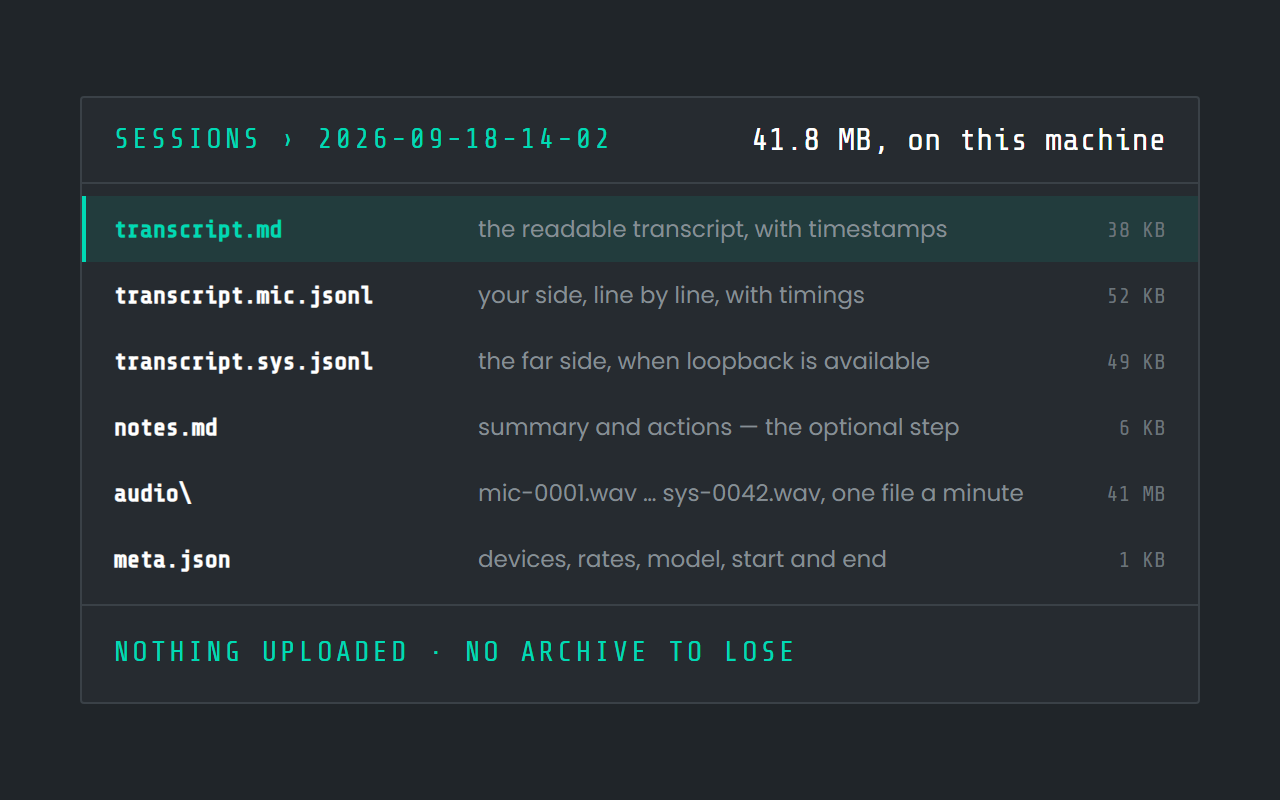
Every one of those is written with no key, no account and no network. A meeting recorded on a laptop with the wifi off produces exactly the same files as one recorded online.
Sessions are named from what was said in them, so a month of meetings reads as a list of subjects rather than thirty timestamps — and a name you type yourself is never overwritten by anything.
While a meeting runs, Deixis says so everywhere you can see it: the tray icon carries a red dot, its menu counts the elapsed time, and the Meetings item in the side rail shows a recording dot and the clock from whichever page of the app you are on.
What the transcript reads like
transcript.md is Markdown, so it opens in anything and pastes into anything. Each line carries
the time it was said and which side said it:
[00:12:34] Me: Annual first. The monthly price exists so nobody feels trapped.
[00:12:41] Them: Then the annual has to be under fifty, or the comparison does the work against us.
[00:13:02] Me: Forty-nine, then. I will write it up.
That format is deliberately boring. It greps, it diffs, it pastes into a ticket, and it survives
whatever tool you move to next — which a transcript inside somebody else's web application does
not. The .jsonl files beside it carry the same lines with their exact timings, for anyone who
wants to do something programmatic with them.
Three minutes of setup, once
The first launch shows one Download button for the speech models: 142 MB, fetched once, after which nothing about dictation or transcription touches the network again. Nothing else needs installing — no runtime, no redistributable, no codec pack.
Then check two things before your first real call. Put on headphones, so the far side does not
arrive twice. And record thirty seconds of something with the chord, stop it, and open the session
folder to see that both transcript.mic.jsonl and transcript.sys.jsonl have lines in them — if
the second is empty, loopback is not available on that sound device and you will be recording your
own side only. Finding that out on a Tuesday afternoon is much better than finding it out after the
meeting you needed.
The one optional paid step
Notes. The summary, the decisions, the action items and the open questions are written by a language model, and that model is either on your machine or on somebody's server. So notes need either a local model you have set up, your own provider key, or Pro at $49 a year.
Notes are deliberately the last step and the most failure-tolerant one: with nothing configured the
meeting still records, still transcribes, and still writes transcript.md. Regenerate notes
retries later, on a session recorded weeks ago, once you have a model to answer.
Everything before that step — the recording, the on-device transcription, the merged transcript, the naming fallback, the files — is free, forever, with no account.
What it is honestly bad at
- Wear headphones if you can. Loopback captures what the speakers play, but your microphone hears them too, so on speakers the far side bleeds into your own side of the transcript. Echo cancellation is out of scope.
- Loopback is not always available. Exclusive-mode devices and some virtual sound cards cannot
be captured; Deixis falls back to microphone-only, says so on screen, and records the fact in
meta.jsonrather than failing the meeting. - English. The shipped speech models are English, and a meeting in another language will record but not transcribe usefully.
- It does not join the call for you. There is no calendar integration and nothing that spots a meeting starting; you press the chord.
- No archive in the cloud. Sessions are folders on your disk. Backing them up is your filesystem's job, not a feature you are paying for.
What a seat costs, and what this does not
The arithmetic is the whole argument. A meeting-notes service is typically sold at somewhere between ten and thirty dollars per person per month, every month, whether or not the person had meetings that month — and the recording of every call is on their disk for as long as their retention policy says. For a team of ten that is a line item somebody has to defend each year.
Deixis records and transcribes for nothing, on hardware you already own, and the only thing you could pay for is the written notes at $49 a year for a person — free if you bring your own provider key. There is no seat count on the recording, because there is no server on the other end of it to count against.
That is also the answer to the question an IT department asks first. What leaves the machine during a meeting is nothing at all unless you have configured notes, in which case the transcript is what leaves, to the endpoint you configured, at the end. Never the audio, on any plan, under any setting.
Where the bot tools still win
The honest version, because a tool that pretends to have no downside is a tool nobody trusts. The meeting-notes services bring a searchable archive across a whole company, they integrate with calendars and CRMs, several of them handle many languages, and they work when the person recording is not at their computer. If those are what you are buying, buy those — and the individual comparisons are on the meetings pages. What they all have in common is that the conversation is uploaded to be transcribed. Deixis is the option where it is not.
Before you ask
Questions people search for
Is meeting recording in Deixis really free?
Yes — recording, on-device transcription and transcript.md need no account, no key and no
network. The only paid part is the written notes, which need a language model, and which are free
with your own provider key.
Does a bot join the meeting?
No. Deixis records your computer's own audio: your microphone and, when the system allows it, the sound coming out of your speakers. Nothing appears in the participant list.
Is the audio uploaded anywhere?
No. Audio never leaves the machine under any setting or plan — a meeting recording cannot even be shared as a link. The transcript is produced on your own processor.
Does it record the other side of a call?
Where loopback is available, yes: the system output is recorded and transcribed as a second channel. Where it is not, Deixis records your microphone only and says so rather than failing.
What happens if my machine crashes mid-meeting?
You lose at most a minute. The WAVs are finalised per segment, and the transcript can be rebuilt from the session folder afterwards.
Does recording a meeting slow down dictation?
No. Dictation always wins: transcription of a meeting yields to any dictation you start, so push-to-talk stays fast while an hour-long recording is still being worked through in the background.
Keep reading
Related pages
How to transcribe a meeting without a bot joining the call
Record both sides of a call on your PC and transcribe it there, with no bot in the participant list and no audio uploaded. How it works, and its limits.
Best dictation software for Windows
Thirteen Windows dictation tools compared, every fact dated from the maker's own pages — including what our own tool cannot do. Read the disclosure.
Offline dictation on Windows
Dictation that works with no internet: speech recognition on your own device, free, no account. Which Windows speech-to-text tools genuinely run offline.
A free screen recorder that keeps the file
Record your screen free, with no watermark, no time limit and no account. The file is an ordinary MP4 in your own folder, and it writes its own transcript.
Screen grabs, annotated, for nothing
A free screenshot and annotation tool: freeze the screen, drag a region, add arrows, boxes, text and numbered steps, and pixelate what is private.
Free voice to text that types where you are
Free dictation that types into any app: hold a key, speak, and punctuated text lands at your cursor. Recognition runs on your own processor.

Hold a key. Speak. Keep working.
Deixis is free, needs no account, and runs on your own device. Everything on this page is in the current release.
v1.2.2 · 64‑bit Windows 10/11 · macOS 13 on Apple silicon · 51 MB · nothing else to install · also for Windows
Everything on this page about Deixis is from its README for the current release. Something out of date? Tell us.