Voice input for your product, without the audio leaving your user
Somebody has asked you for voice input. A support desk wants agents to talk into the reply box, a field service app wants notes dictated with gloves on, an internal tool wants a bug described rather than typed. Every way of building it has the same problem underneath: the moment you accept audio, you are responsible for it.
The browser's own speech recognition sends the audio to the browser vendor. A speech API means you are now a processor of your customers' voice recordings, with a bill per minute and a paragraph in your privacy policy you will have to defend to somebody's security review. Shipping a model inside your own app means shipping a couple of hundred megabytes and owning the accuracy problem forever.
There is a fourth option, and it is the reason this page exists: let the copy of Deixis on the user's machine do it. Your page asks for words; the recognition happens on their processor; the words arrive in your field. No audio reaches your servers, ours, or any cloud, because it never leaves the computer it was spoken on.
What you get
More than dictation. One key, and everything behind it.
Hold the key and press a letter: free mode, a grab, a meeting, a recording, a translation, your own buttons. All of it on your own device, all of it free, none of it behind an account.

Dictation, where your cursor is
Hold a key, speak, release. Clean, punctuated text lands in whatever has focus, on your PC, your Mac and your phone, with your clipboard handed back.

Free mode: talk and point
Narrate for as long as you like while you grab a region, pick a button on screen or take a selection. One note, what you said interleaved with what you pointed at, pasted where you finish and saved as Markdown.

Screen grabs, annotated
Freeze every screen at the keypress, drag a region, add arrows, boxes, text and numbered steps, and pixelate what is private. Saved as a PNG that stays editable.

Screen recording, shared as a link
Record the screen with your narration. The recording writes itself up with a title, chapters and a summary, and from your Deixis account it shares as a link anyone can open without one. The Loom you can stop paying for.

Meetings, no bot, names included
Your microphone and the other side, transcribed on your machine while the call runs. Deixis tells the voices apart and remembers the ones you name, and never uploads a voice.

Your own buttons and workflows
Add a button to the palette: it gets the note on stdin and types back whatever it prints. Send finished notes to any URL you own. Chain steps: read the text off a screenshot, translate it, summarise it, post it.
Voice input for your product, without the audio leaving your user
About ten lines
Load the SDK and ask. available() tells you whether there is a Deixis on this machine willing to
talk to your origin, and dictate() asks the user for one dictation.
<script src="https://deixis-voice.com/sdk.js"></script>
button.addEventListener('click', async () => {
  const { installed, download } = await deixis.available();
  if (!installed) return showDownloadLink(download);  // a download that knows your site

  // The user holds their Deixis key and speaks; the words come back cleaned.
  input.value = await deixis.dictate();
});
That is the whole integration for the common case. There is no API key, no account, no npm dependency, no build step and no server component on your side.
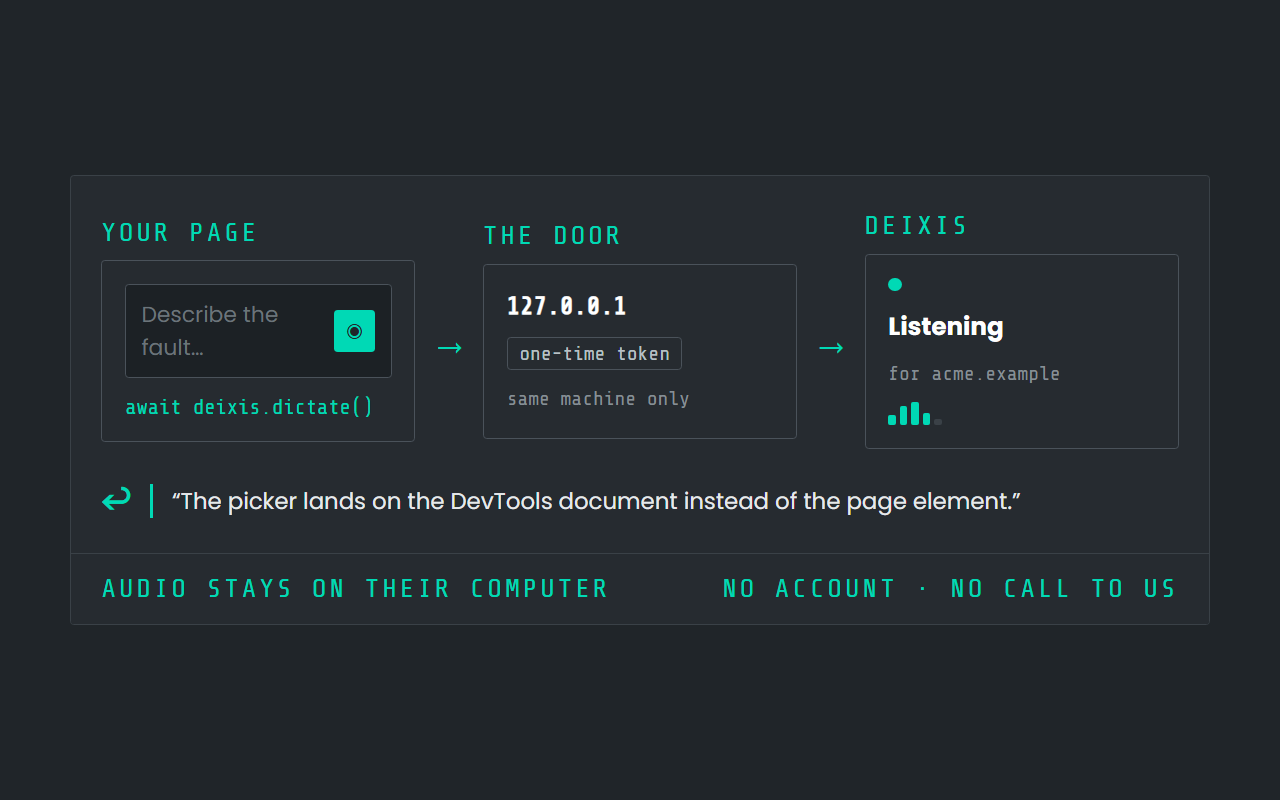
If you want the microphone button most apps actually want — press to talk, release to stop, with no keyboard chord for the user to learn — there is a second pair of calls, and the user grants that separately:
await deixis.start({ onPartial: (text) => (preview.textContent = text) });
// …the user speaks, your button says Stop…
input.value = await deixis.stop();   // the finished, cleaned transcript
While that runs, Deixis puts its own overlay on screen naming your site, with its own Stop, and it ends the recording itself if your page goes away or after ten minutes. None of that is yours to change, and that is deliberate: a microphone opened by a web page should always be visibly a microphone, and always be closable by the person it is pointed at.
Three rules the design puts on you
They are short, and each of them exists because the alternative would be a way to abuse somebody's microphone.
1. Call it from a real user action, never on page load. Chrome gates a page's first request to
a loopback address behind a Local Network Access prompt. While that prompt is unanswered the
request neither succeeds nor fails, so await deixis.available() at load time is a hung page with
nothing in the console. From a click, it is a one-time question the user understands, and after
they allow it a probe costs about two milliseconds.
2. installed: false means "could not reach it", not "not installed". Deixis may be running
with the door off, or your origin may not be on the user's list, or they may not have answered the
browser yet. Those are deliberately indistinguishable: a page that is not allowed to talk to Deixis
is told nothing about whether Deixis is there. Treat it as "no voice right now" and keep your own
interface working. The one thing you can tell apart is the browser's own refusal —
permission: 'denied' — which is worth a different message, because no amount of retrying will fix
it until the user unblocks your site.
3. You are never given the microphone, only the words. dictate() does not open anything: it
asks Deixis to route the user's next hold-to-talk to you, and if they never speak, your promise
rejects on its deadline. Your page does not see the audio, does not see what the user dictates
anywhere else, and does not see their history, notes, recordings, account or the other programs
talking to Deixis.
Design for the missing grant, too. "Start and stop the microphone" is off for every site until the
user ticks it, so a start() without it rejects with not_granted — offer the button, and fall
back to dictate() with a line telling the user to hold their key.
When Deixis is not on the machine
This is where most local-companion integrations quietly fail. The user follows your download link, installs the thing, comes back, presses your button — and nothing happens, because the app has no idea your site exists and the user is four steps deep in a settings panel they have never seen.
So do not write the download link yourself. available() hands you one:
const { installed, download } = await deixis.available();
if (!installed) link.href = download;   // carries your site's name
An installer fetched through that link arrives knowing where it came from. On its first run Deixis puts one card on screen with your site's name on it — Allow or Not now — and Allow does the four settings steps at once: the door on, your origin listed, the permissions decided under your name.
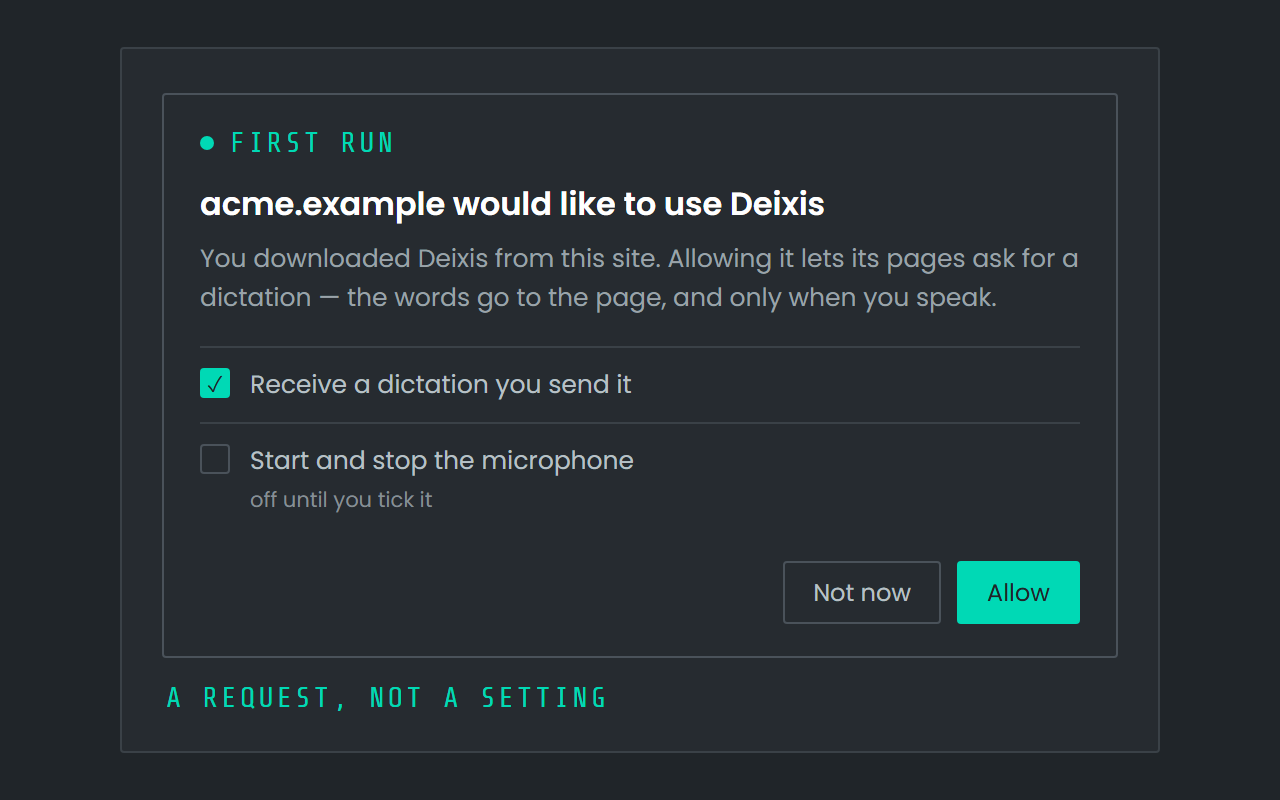
Note what the card is: a request, answered by the person. A filename is chosen by whoever serves the file, so an installer that granted on the strength of one would be a way for any page to allowlist itself, and with the microphone tick, a way for a site nobody has looked at to open a microphone. That would be the exact thing this product exists to promise it does not do. So the microphone tick starts unticked, and "Not now" is nothing at all.
Two practical notes: a page served over plain http, on localhost, or on a non-standard port
gets the plain download link rather than a tagged one, because the installer will only carry a site
it could safely offer. And the web door arrives with Deixis 1.1.12 — on an earlier version
available() simply reports that nothing answered, which is the case your code already handles.
If your product is not a web app
A desktop program connects to the same engine through a named pipe on Windows or a unix socket on macOS — never a TCP port, which is why no firewall ever asks about it. While the door is open, Deixis writes a small file beside the user's settings holding the address and a key minted fresh each time; a program that can read that file can connect, and one that cannot, cannot.
Five requests are all a connected program may send, and each is a tick the user controls: put a short question on the HUD and get the answer, claim a letter on the mode palette and be told when it is pressed, receive a dictation the user routes to it, ask the user to click something on screen and receive what they clicked, and type a line into a field. The last two are off for every program until the user switches them on, because the first three cannot do anything without a move from the user, and those two can. Everything the app itself does — changing settings, deleting a recording, shutting the engine down — is refused by name on the connection.
core/examples/client.rs in the repository drives all five in turn and prints what came back,
including the refusals, so it is the fastest way to learn the protocol. The whole model is written
up in the local connections docs.
A server does not connect to Deixis at all — Deixis pushes to it. Point a webhook at a URL you own and every finished note, grab or translation arrives as one signed JSON POST, with an HMAC over the timestamp and the body so you can prove the delivery is real and reject replays. That is in the webhook docs, with a worked verification in Node.
What it costs, for you and for them
Nothing, on both sides. The SDK is a static file, there is no key to apply for, no per-seat charge for an integration and no rate limit on a door that never touches our infrastructure. Your users need Deixis installed; dictation in Deixis is free forever with no account, so "install Deixis" is not a purchase you are asking them to make on your behalf. What people pay us for is the optional cloud tier — model cleanup, translation and meeting notes — at $49 a year, and it is not needed for anything on this page.
If you are building something substantial on this and want a commercial relationship around it rather than just a support address, write to support@deixis-voice.com and say what you are building. There is no published partner programme to sign up to today, and we would rather say that plainly than point you at a page that does not exist.
What it will not do
- It is not a speech API. There is no endpoint you can call from your backend, and no way to transcribe a file your server holds. The user is present, on their own machine, or there is nothing.
- English. The shipped speech models are English.
- Windows needs AVX2 (2013 or later); macOS needs 13 or later on Apple silicon. There is no Linux build.
- You cannot pre-allow yourself, silently enable the door, or read anything the user has not handed you in the moment. Every one of those is refused rather than rate-limited.
Before you ask
Questions people search for
Does any audio reach my servers or yours?
No. Recognition is in-process on the user's own machine, and the door your page talks to is on their loopback address. Your page receives text; nobody receives the recording.
Do I need an API key or an account?
No. The SDK is a script tag, the door is on the user's machine, and there is no registration step for you or for them. Dictation in Deixis needs no account either.
What happens if the user does not have Deixis?
available() returns installed: false along with a download link that carries your site's name,
so the copy they install can offer them your site on first run with a single Allow.
Can my page turn on the user's microphone?
Only if that user has ticked "Start and stop the microphone" for your origin, which is off by
default. Without it, start() is refused and you fall back to dictate(), which needs the user to
hold their own key and speak.
Can I use this in a desktop app rather than a web page?
Yes — a local pipe on Windows or a unix socket on macOS, with five requests the user grants individually, and a worked example in the repository. See local connections.
Is there a commission or referral programme for integrations?
Not today. Installs coming through a tagged link are attributed, but there is no published rate or programme to join; if that matters to what you are building, email us and say so.
Keep reading
Related pages
Best dictation software for Windows
Thirteen Windows dictation tools compared, every fact dated from the maker's own pages — including what our own tool cannot do. Read the disclosure.
Offline dictation on Windows
Dictation that works with no internet: speech recognition on your own device, free, no account. Which Windows speech-to-text tools genuinely run offline.
Free voice to text that types where you are
Free dictation that types into any app: hold a key, speak, and punctuated text lands at your cursor. Recognition runs on your own processor.

Hold a key. Speak. Keep working.
Deixis is free, needs no account, and runs on your own device. Everything on this page is in the current release.
v1.2.2 · 64‑bit Windows 10/11 · macOS 13 on Apple silicon · 51 MB · nothing else to install · also for Windows
Everything on this page about Deixis is from its README for the current release. Something out of date? Tell us.