A free screen recorder that keeps the file
Most free screen recorders are free in one of two ways. Either they stamp their name across your video and stop it after a few minutes, or they are free because the recording goes to their servers and the free part is the upload. Deixis is free in neither of those ways: it records to an ordinary MP4 in a folder on your own computer, there is no watermark, there is no length at which it stops, and nothing is uploaded unless you deliberately press a button that says it will be.
It is free because there is nothing to charge for. The recording is FFmpeg writing a file on your machine, and the transcript it writes afterwards comes from a speech model that also runs on your machine. No server touches either one, so there is no per-minute cost for anyone to pass on to you.
You need a Deixis account for exactly one thing on this page, and it is named in its own section below: turning a finished recording into a link somebody else can open.
What you are downloading
This is Deixis, a desktop app for Windows.
The tool on this page is one feature of it, not a separate download. The Download button hands you a signed Windows installer, Deixis_<version>_x64-setup.exe, published by Dappit — Windows names the publisher before it runs. There is no bundled extra software, no toolbar and no second installer. Deixis needs no account to install and none of what this page calls free is behind a sign-up. What it runs on.
Why it is free, and when it is not
If it happens on your computer, it is free. If it needs our model, it is not.
That is the whole rule, and it is the reason none of this is a limited free tier waiting to run out. Speech recognition is a file on your own disk doing work on your own processor: it costs us nothing to let you run it, so we do not charge for it and there is nothing to meter. The only features that cost anything are the ones where a language model has to answer — and even those are free if the model is yours.
| What it is | What it costs |
|---|---|
| Everything that runs on your machineDictation, free mode, the dictionary and packs, screen grabs and annotation, screen recording, meeting recording and on-device transcription, history and export, custom buttons, webhooks to your own URLs. | Free, forever. No account, no trial clock, nothing metered. |
| The three things that need a language modelCleaning up an utterance with a model rather than with rules, translating a selection, and writing up a meeting into notes. A model runs on hardware somebody pays for — yours, or ours. | Free with a model of your own: a local one, or your own provider key. Otherwise Deixis Pro, $49 a year or $10 a month — or a seat, where your team pays instead. |
| Sharing a linkUploading a grab, a note or a screen recording so somebody else can open it as a URL, with an expiry of 1 to 90 days and revocable at any time. | Needs a Deixis account, and is part of the same paid tier. It is storage and bandwidth on our side. |
A subscription buys convenience, not capability: every paid row above is open to anyone with their own provider key, free, forever. The seven-day trial covers only the paid row, is opt-in, and needs no card. The full version is in the docs.
What you get
More than dictation. One key, and everything behind it.
Hold the key and press a letter: free mode, a grab, a meeting, a recording, a translation, your own buttons. All of it on your own device, all of it free, none of it behind an account.

Dictation, where your cursor is
Hold a key, speak, release. Clean, punctuated text lands in whatever has focus, on your PC, your Mac and your phone, with your clipboard handed back.

Free mode: talk and point
Narrate for as long as you like while you grab a region, pick a button on screen or take a selection. One note, what you said interleaved with what you pointed at, pasted where you finish and saved as Markdown.

Screen grabs, annotated
Freeze every screen at the keypress, drag a region, add arrows, boxes, text and numbered steps, and pixelate what is private. Saved as a PNG that stays editable.

Screen recording, shared as a link
Record the screen with your narration. The recording writes itself up with a title, chapters and a summary, and from your Deixis account it shares as a link anyone can open without one. The Loom you can stop paying for.

Meetings, no bot, names included
Your microphone and the other side, transcribed on your machine while the call runs. Deixis tells the voices apart and remembers the ones you name, and never uploads a voice.

Your own buttons and workflows
Add a button to the palette: it gets the note on stdin and types back whatever it prints. Send finished notes to any URL you own. Chain steps: read the text off a screenshot, translate it, summarise it, post it.
A free screen recorder that keeps the file
Pressing record
Hold Ctrl+Win and press V. The screen freezes so you can aim: drag a region, click a window,
press Enter for the whole screen, or Esc to cancel. Press the chord again to stop, and the file is
saved.
While it runs, the recording says so. A small bar sits on the screen being recorded — a red dot, the elapsed time, Pause and Stop — beside the recorded area where there is room and tucked into a corner where there is not. Drag it out of the way by its body and the next recording starts where you left it. The tray icon carries a red badge at the same time, and its menu counts the time: Stop recording (3:07), with Pause beside it.
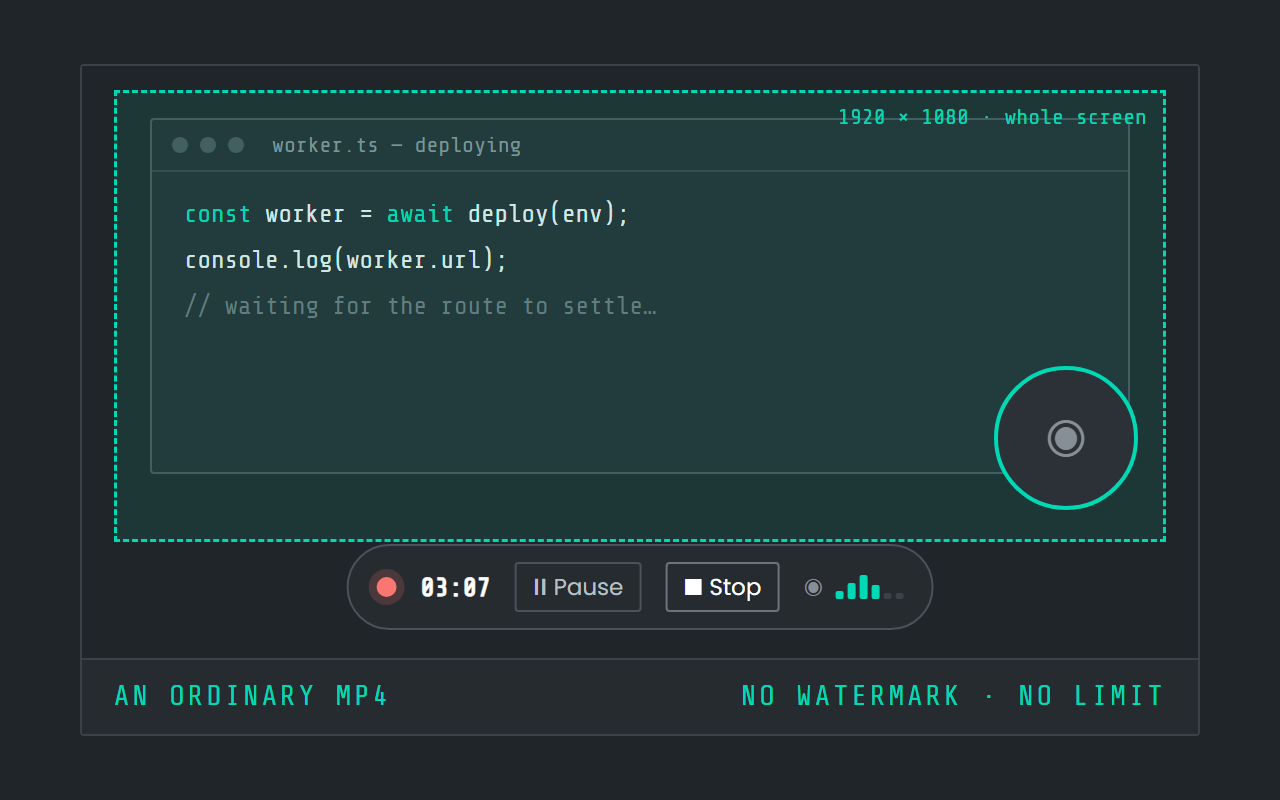
Pause is a real pause, not a second file. The dot stops pulsing, the word becomes Paused, the clock holds still, and the time you spent paused is in neither the finished video nor the elapsed count. Stop saves one file with the pause simply not in it.
FFmpeg ships inside the installer, so there is nothing to install alongside it and nothing to configure before the first recording.
What happens when you stop
If a microphone was part of the recording, the video writes itself up. What you said is transcribed on this machine, split into chapters, and turned into a title and a short summary — so the row in your Library reads as "Deploying the worker" and a sentence about it, rather than as a timestamp. Transcript opens the whole thing as Markdown beside the video. Rename gives it a name of your own, and a name you typed is never overwritten by anything.
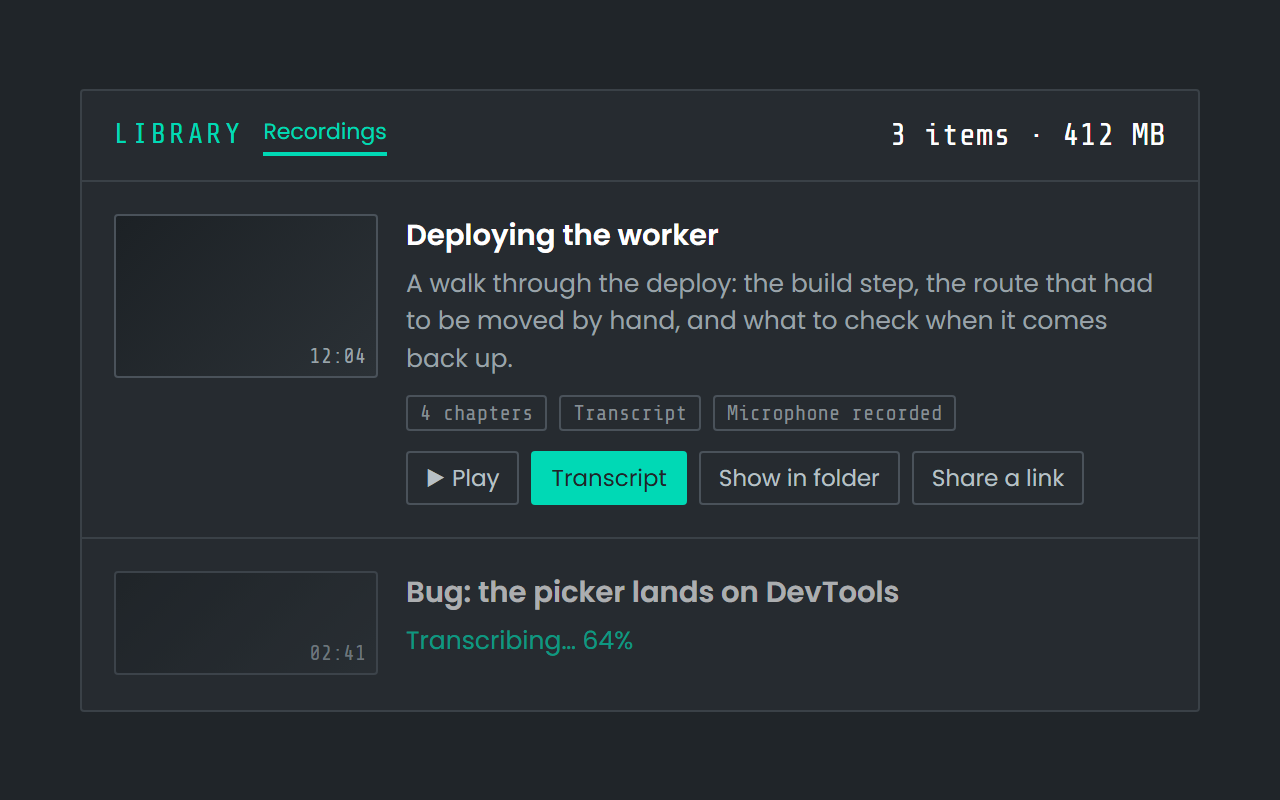
The row is honest about which state it is in, which matters more than it sounds: a recording made with no microphone says it will never have a transcript rather than pretending to be working on one; one waiting to be transcribed offers Transcribe; one in progress says how far it has got; and one with no summary says why, and offers Summarise.
The transcript is always local. The title and the summary come from a model on your own machine if you have one set up, and from the Deixis endpoint otherwise — and with neither configured you still get the transcript and the chapters, and the row tells you so. Nothing about that step is a condition of recording.
Where the files are
In a folder you can open, back up, and delete from — which is the part most of the free recorders do not give you.
Recordings land in %USERPROFILE%\.deixis\recordings\ as <stamp>.mp4, with the audio, the
transcript (.transcript.md and .transcript.jsonl) and the title and summary (.notes.json)
beside each one. Screen grabs go to .deixis\screenshots\, notes to .deixis\notes\, and every
setting you have changed is one readable config.toml in the same place. There is no library
database that owns your videos and no export step: the file is the file.
The one part that is not free
Share a link. From the Library, a finished recording can be uploaded and handed to somebody as a URL they can open in a browser with nothing to install and no account of their own. That is the one thing on this page that costs money, for the obvious reason: it is storage and bandwidth on somebody else's machine, and that somebody is us.
Sharing needs a Deixis account. Every link carries an expiry between one and ninety days, you choose who it is for — anyone holding the URL, your team, or a list of specific people — and you can revoke it at any time from the Library's Shared filter, which lists every link you have made, how much room it is using, and when it dies.
Everything else in this article happens with no account at all. Recording, pausing, stopping, transcribing, chaptering and keeping the file are yours whether or not you ever sign in, and they keep working when a trial ends, because they never depended on it starting.
What it will not do
The honest list, because a free tool that oversells itself costs you an afternoon before you find out.
- There is no editor. Deixis records and writes the file. Trimming, cutting and titling belong to whatever you already use for that.
- The recording is silent unless a microphone is set up, and with no microphone there is nothing to transcribe, so no transcript and no summary.
- Speech recognition is English. The models that ship are English; a recording in another language records perfectly well and will not transcribe usefully.
- Windows needs AVX2 — an Intel Haswell or AMD Excavator processor, 2013 or later. That is a hard floor rather than a recommendation: speech recognition is compiled against that instruction set. Deixis also runs on macOS 13 and later on Apple silicon.
- It does not record a meeting for you in the background. Meeting mode is a separate thing on the same chord, and is its own page.
If what you want is a recording that lives in a service, with a viewing page, comments and captions around it, the Loom comparison is the honest version of that argument — including where Loom is the better tool.
Before you ask
Questions people search for
Is Deixis screen recording actually free, or free for a while?
Actually free. Recording, stopping, the transcript, the chapters and the file itself need no account and no subscription, and nothing about them is metered. The only paid part is turning a recording into a shared link, which is storage on our side.
Does it put a watermark on the video?
No. The MP4 is the screen as it was, with no logo, no corner badge and no outro.
How long can a recording be?
There is no limit in Deixis. What bounds it is your disk.
Where is the video saved?
%USERPROFILE%\.deixis\recordings\, as an ordinary MP4, with the transcript and the summary in
files beside it. Nothing is uploaded on the way there.
Can I record just one window?
Yes. When the screen freezes you can drag a region, click a single window, or press Enter for the whole screen.
Do I need to install FFmpeg?
No. It ships inside the installer. A development checkout of the source falls back to an ffmpeg
on your PATH, which is a detail for people building Deixis themselves.
Keep reading
Related pages
Best dictation software for Windows
Thirteen Windows dictation tools compared, every fact dated from the maker's own pages — including what our own tool cannot do. Read the disclosure.
Offline dictation on Windows
Dictation that works with no internet: speech recognition on your own device, free, no account. Which Windows speech-to-text tools genuinely run offline.
Screen grabs, annotated, for nothing
A free screenshot and annotation tool: freeze the screen, drag a region, add arrows, boxes, text and numbered steps, and pixelate what is private.
Free voice to text that types where you are
Free dictation that types into any app: hold a key, speak, and punctuated text lands at your cursor. Recognition runs on your own processor.
A free meeting recorder that sends nothing
Record both sides of a call and transcribe it on your own machine, free and with no account. Nothing joins the meeting and nothing uploads the audio.

Hold a key. Speak. Keep working.
Deixis is free, needs no account, and runs on your own device. Everything on this page is in the current release.
v1.2.2 · 64‑bit Windows 10/11 · macOS 13 on Apple silicon · 51 MB · nothing else to install · also for Windows
Everything on this page about Deixis is from its README for the current release. Something out of date? Tell us.