Screen grabs, annotated, for nothing
The screenshot tool people actually want is not the one that copies a rectangle to the clipboard. It is the one that lets you circle the broken thing, number the three steps that got you there, and black out the customer's name before you paste it into a ticket. That tool usually costs about sixty dollars.
In Deixis it is a keypress, it is free, and it needs no account. Hold Ctrl+Win and press S:
every monitor freezes at that instant, so the menu you were trying to capture stays open while you
aim. Drag a region and it saves itself, or open the editor and mark it up.
What you are downloading
This is Deixis, a desktop app for Windows.
The tool on this page is one feature of it, not a separate download. The Download button hands you a signed Windows installer, Deixis_<version>_x64-setup.exe, published by Dappit — Windows names the publisher before it runs. There is no bundled extra software, no toolbar and no second installer. Deixis needs no account to install and none of what this page calls free is behind a sign-up. What it runs on.
Why it is free, and when it is not
If it happens on your computer, it is free. If it needs our model, it is not.
That is the whole rule, and it is the reason none of this is a limited free tier waiting to run out. Speech recognition is a file on your own disk doing work on your own processor: it costs us nothing to let you run it, so we do not charge for it and there is nothing to meter. The only features that cost anything are the ones where a language model has to answer — and even those are free if the model is yours.
| What it is | What it costs |
|---|---|
| Everything that runs on your machineDictation, free mode, the dictionary and packs, screen grabs and annotation, screen recording, meeting recording and on-device transcription, history and export, custom buttons, webhooks to your own URLs. | Free, forever. No account, no trial clock, nothing metered. |
| The three things that need a language modelCleaning up an utterance with a model rather than with rules, translating a selection, and writing up a meeting into notes. A model runs on hardware somebody pays for — yours, or ours. | Free with a model of your own: a local one, or your own provider key. Otherwise Deixis Pro, $49 a year or $10 a month — or a seat, where your team pays instead. |
| Sharing a linkUploading a grab, a note or a screen recording so somebody else can open it as a URL, with an expiry of 1 to 90 days and revocable at any time. | Needs a Deixis account, and is part of the same paid tier. It is storage and bandwidth on our side. |
A subscription buys convenience, not capability: every paid row above is open to anyone with their own provider key, free, forever. The seven-day trial covers only the paid row, is opt-in, and needs no card. The full version is in the docs.
What you get
More than dictation. One key, and everything behind it.
Hold the key and press a letter: free mode, a grab, a meeting, a recording, a translation, your own buttons. All of it on your own device, all of it free, none of it behind an account.

Dictation, where your cursor is
Hold a key, speak, release. Clean, punctuated text lands in whatever has focus, on your PC, your Mac and your phone, with your clipboard handed back.

Free mode: talk and point
Narrate for as long as you like while you grab a region, pick a button on screen or take a selection. One note, what you said interleaved with what you pointed at, pasted where you finish and saved as Markdown.

Screen grabs, annotated
Freeze every screen at the keypress, drag a region, add arrows, boxes, text and numbered steps, and pixelate what is private. Saved as a PNG that stays editable.

Screen recording, shared as a link
Record the screen with your narration. The recording writes itself up with a title, chapters and a summary, and from your Deixis account it shares as a link anyone can open without one. The Loom you can stop paying for.

Meetings, no bot, names included
Your microphone and the other side, transcribed on your machine while the call runs. Deixis tells the voices apart and remembers the ones you name, and never uploads a voice.

Your own buttons and workflows
Add a button to the palette: it gets the note on stdin and types back whatever it prints. Send finished notes to any URL you own. Chain steps: read the text off a screenshot, translate it, summarise it, post it.
Screen grabs, annotated, for nothing
What is in the editor
Arrow, rectangle, ellipse, pen, highlighter, text, pixelate — and auto-numbered step badges, which are the tool that makes a bug report readable. Copy puts a real image on the clipboard, ready to paste into a ticket, a chat or an email. Save writes the PNG.
Redaction deserves its own sentence, because it is the reason a lot of people cannot share a screenshot at all: the pixelate tool covers a region of the picture, so a customer's name, an API key or an address in a URL bar does not travel with the screenshot you are about to paste into a ticket that several people will read.
Every grab stays editable
Each save writes a small .json sidecar beside the PNG holding the clean image and the list of
annotations. The grab is therefore not flattened forever: Re-edit in the Library opens it again
with every arrow and box still a separate thing you can move, change or delete.
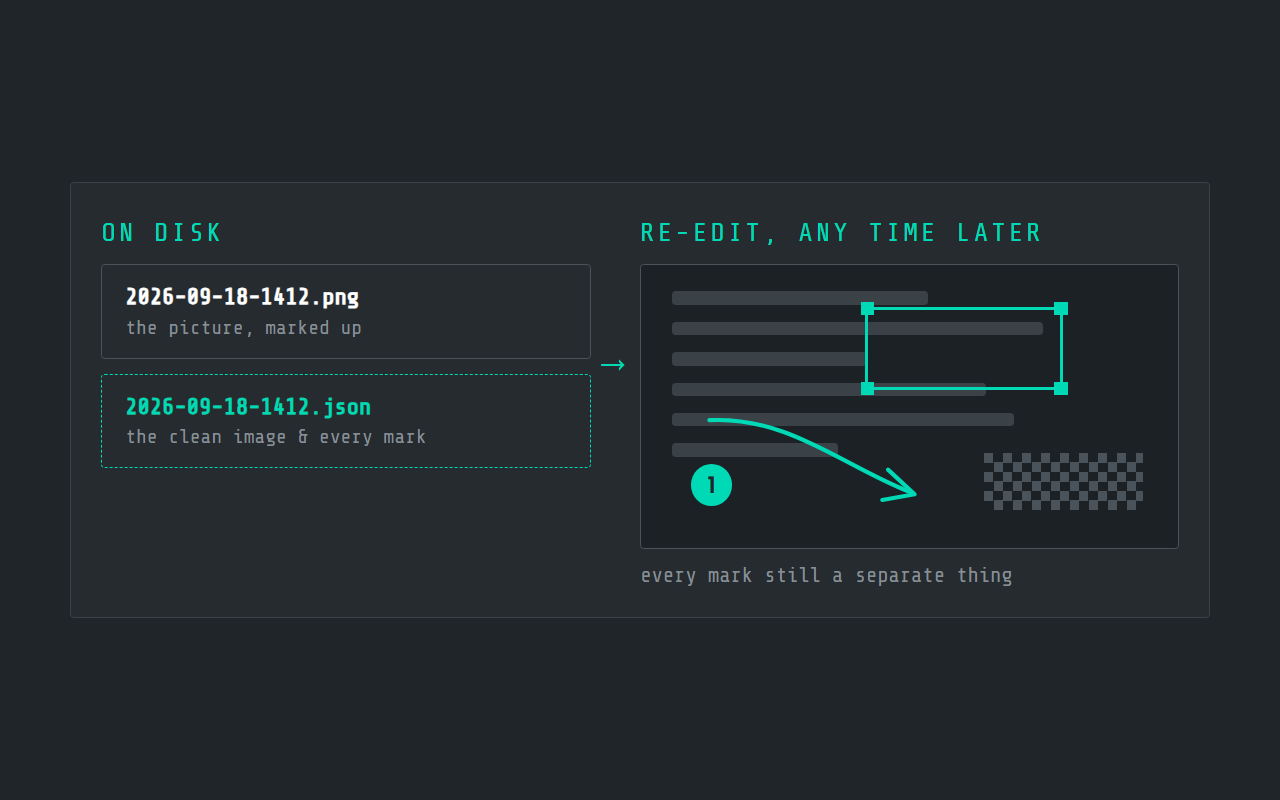
That matters more than it sounds. The usual workflow with an annotation tool is to keep the unmarked original somewhere in case the arrow ends up in the wrong place, and then to lose track of which file is which. Here the marked-up PNG is the original, and the annotations are data beside it.
Saved grabs land in %USERPROFILE%\.deixis\screenshots\, as ordinary PNGs in an ordinary folder.
Nothing is uploaded on the way there, and nothing needs an account to be written.
Grabbing while you talk
The part that has no equivalent in a screenshot tool: you can narrate while you collect.
Double-tap Ctrl+Win for free mode and Deixis keeps listening until you double-tap again. While it
listens, tap the chord for the session toolbar at your cursor — S for a quick grab, A for the
annotation editor, T for the text you have selected, E to pick an element on screen. PrintScreen
grabs at any time during a session.
What comes out is one note, in which what you said is interleaved with what you pointed at, pasted
at the caret where you finish and saved as Markdown in .deixis\notes\ with its images beside it.
A bug report written this way takes about as long as the bug took to reproduce, because you are
describing it while you reproduce it rather than afterwards from memory.
Sending a grab somewhere by itself
A screenshot usually has a destination: a ticket, a channel, a page in whatever wiki your team keeps. Two things in Deixis go straight there without a paste.
Webhooks. Add a URL you own to your config, and every finished note, grab or translation arrives at it as one signed JSON POST — the title, the text, the Markdown, and for a grab the path and filename of the image. Delivery happens on a background thread with three attempts and a backoff, so nothing waits on your endpoint, and every attempt shows up in the Activity feed. The signature is an HMAC over the timestamp and the body, so your receiver can prove the delivery came from your Deixis and not from somebody who found the URL.
Custom buttons. Put your own action on the palette or the session toolbar: it gets the same JSON, runs whatever program you name, and can type its output back at your caret. A grab, a script that files a ticket, and the ticket number typed into the message you were already writing — that is three lines of config and a script you already have.
Both are free. Neither goes through us: a webhook is your URL, and a button is your program on your machine.
What it costs
Nothing, and there is no tier above it for this feature. Screen capture, the annotation editor, the re-editable sidecar, free mode and the notes it writes are all in the free product, with no account and no sign-in prompt.
The only thing on this page you could pay for is Share a link — uploading a grab or a note so somebody else can open it as a URL. That needs a Deixis account, carries an expiry of one to ninety days, and can be revoked at any time. It is the one feature here that uses somebody else's disk.
For completeness, the two things that are free but need a model somewhere: translating a selection, and the language-model cleanup of a long dictation. Both are free with your own provider key, or included in Pro at $49 a year. Neither has anything to do with taking a screenshot.
What it will not do
- It does not read the text out of an image in the capture editor. Picking up a text
selection is a different thing, and it is what
Tin the session toolbar does. - It does not record video from here. Screen recording is the same chord with
V, and is its own page. - There is no cloud library of your screenshots, by design. They are PNGs in a folder you control, and the Library is a view of that folder rather than a service.
- Windows needs AVX2 — a 2013-or-later Intel or AMD processor — because the same install carries speech recognition. Deixis also runs on macOS 13 and later on Apple silicon.
Before you ask
Questions people search for
Is the annotation editor free, or is it the paid part?
Free. Arrows, boxes, ellipses, pen, highlighter, text, numbered steps and pixelate are all in the free product, with no account, and nothing about them is metered or time-limited.
Can I black out private information before sharing a screenshot?
Yes — the pixelate tool covers a region of the image. Use it before you copy or save, and the covered region is not in the PNG that leaves your machine.
Where do screenshots get saved?
%USERPROFILE%\.deixis\screenshots\, as PNG, with a small .json sidecar beside each one that
keeps it re-editable. Nothing is uploaded unless you press Share a link.
Can I edit a screenshot again after saving it?
Yes. Re-edit in the Library reopens it with every annotation still separate, because the sidecar kept the clean image and the annotation list rather than flattening them together.
Does the screen freeze while I pick a region?
Yes, every monitor freezes at the keypress, which is what lets you capture an open menu or a hover state that would otherwise vanish the moment you reached for the mouse.
Do I need an account to take a screenshot?
No. Deixis never asks you to sign in to capture, annotate or save. An account is needed only for sharing a link, which uploads the file.
Keep reading
Related pages
Best dictation software for Windows
Thirteen Windows dictation tools compared, every fact dated from the maker's own pages — including what our own tool cannot do. Read the disclosure.
Offline dictation on Windows
Dictation that works with no internet: speech recognition on your own device, free, no account. Which Windows speech-to-text tools genuinely run offline.
Free voice to text that types where you are
Free dictation that types into any app: hold a key, speak, and punctuated text lands at your cursor. Recognition runs on your own processor.
A free meeting recorder that sends nothing
Record both sides of a call and transcribe it on your own machine, free and with no account. Nothing joins the meeting and nothing uploads the audio.
A free screen recorder that keeps the file
Record your screen free, with no watermark, no time limit and no account. The file is an ordinary MP4 in your own folder, and it writes its own transcript.

Hold a key. Speak. Keep working.
Deixis is free, needs no account, and runs on your own device. Everything on this page is in the current release.
v1.2.2 · 64‑bit Windows 10/11 · macOS 13 on Apple silicon · 51 MB · nothing else to install · also for Windows
Everything on this page about Deixis is from its README for the current release. Something out of date? Tell us.