Superwhisper or Deixis on your Mac: the models, the price and what leaves
Superwhisper and Deixis start in the same place on a Mac: press a key, talk, and the words land in the app you are using, with the speech recognised on the Mac itself. They part company at what happens to the words next. Superwhisper's own plans page lists its AI modes, Super Mode among them, and its context awareness under Pro, and every language model it offers, cloud or local, is a Pro model, at $8.49 a month or $84.99 a year. Deixis tidies your dictation on your Mac for nothing.
Hold Ctrl+Option, speak, let go. Deixis types the text at the caret of whatever app has focus,
puts your clipboard back, and tidies the sentence with rules on the Mac. When you do want a language
model, it sends the sentence, your vocabulary, your previous sentence in that field and the names of
the app and the field. Never the window title, never your name, never the audio. No account, no
licence key, no word count.
Superwhisper is a polished and ambitious product, with a hundred-plus languages, a model for every taste and an app for every platform, and the list below gives it its due. But if you want dictation that is tidy out of the box, sends as little as possible, and costs nothing for all of that, Deixis is the better fit for your Mac. Here is the detail, from Superwhisper's own pages.
Why switch
What you gain, and what you give up
Why Deixis
- Tidy dictation, free, from the first sentence. Deixis cleans up what you say with rules on your Mac, with no key, no provider, no licence and nothing metered. On Superwhisper, the free plan gives you unlimited dictation on the local Whisper models, a vocabulary, text replacements and up to two modes; the AI modes that format your words, the context they read and every language model are Pro.
- It runs on macOS 13. Superwhisper's quickstart asks for macOS 14 or later. Deixis runs on Apple silicon Macs from macOS 13 on, so a Mac still on Ventura can dictate today without an upgrade first.
- What cleanup sends is small, and none of it is about you. When Deixis asks a language model for help, it sends the sentence, your vocabulary, your previous sentence in that field and the names of the app and the field. Superwhisper's Super Mode, per its own docs, sends the text of the input field you are in, the name and title of the active window, anything you have selected, text you copied just before or while you spoke, the date and time, your full name and your computer's name. All three kinds of context are on by default in that mode. A window title is where document names, customer names and ticket subjects live, which is why Deixis stopped sending it.
- Less to pay for the cloud, and your own key costs nothing. Deixis Pro is $49 a year against Superwhisper's $84.99. (By the month Superwhisper is cheaper, $8.49 against $10, and it sells a lifetime licence at $249.99.) Bring your own provider key and Deixis's cloud cleanup is free, the key used for that call and not kept; on Superwhisper, bringing your own keys is itself on the Pro list.
- A chord that does more than dictate. Double-tap
Ctrl+Optionand talk a problem through while you collect selected text and regions of the screen along the way; it all comes back as a single note at your cursor, words and pictures in the order you gave them. Hold the chord and pressSfor a screenshot you mark up with arrows, numbered steps and a pixelated patch, orVto record the screen to a video file. Superwhisper has neither. - Nothing to count and nothing to activate. Superwhisper gives new users 3,000 words of Pro and a licence key to paste once they buy. Deixis has no word allowance, no key and no account for anything that runs on the Mac, so nothing on the Mac stops working when a trial ends.
Where Superwhisper still wins
- Intel Macs too. Superwhisper's FAQ says it runs on Intel Macs, best with its cloud models, because its offline models only run really well on Apple silicon. Deixis for the Mac needs Apple silicon; an Intel Mac cannot run it at all.
- A hundred-plus languages. Superwhisper transcribes over a hundred languages and dialects, and Pro can render any of them as English text. Deixis's speech models are English-only, so it dictates in English and nothing else.
- An AI model that stays on the Mac. On Pro, pair a local voice model, Cohere Transcribe, Parakeet or Whisper, with S1-mini, its local language model, and even the AI modes run on your Mac with nothing leaving it. Deixis's rules run on the Mac, and it can use a model you run on your own Mac, but it ships no language model of its own.
- Modes, and a menu of models. Custom modes carry your own instructions and a choice of which context each one sees, and run on S1-Language, Claude, GPT or a Groq-hosted Llama, or on your own keys. Deixis has no mode to write; the names of the app and the field do that job for it.
- Meetings and files, on the Mac. Meeting mode records and summarises meetings, with system audio and speaker separation on Pro, and Superwhisper transcribes audio and video files you hand it. Deixis records meetings on Windows and on Android, not yet on the Mac, and takes no files.
- One licence for every device. Pro covers unlimited Macs and Windows PCs, plus an iPhone and an Android phone. Deixis runs on the Mac, Windows and Android; its iPhone keyboard is in beta on TestFlight, not yet in the App Store.
- Coding agents and companies. Superwhisper names integrations with Claude Code, Codex, Cursor and other agent tools, a command line and an MCP server, and for companies single sign-on, rollout through Jamf or Intune and control over which models people may use. Deixis dictates into an agent as into any other app, and has none of that enterprise machinery.
What you get
More than dictation, on your Mac.
Hold Ctrl+Option and speak, or press a letter while you hold it: free mode, a grab, a screen recording. All of it on your Mac, all of it free, none of it behind an account.
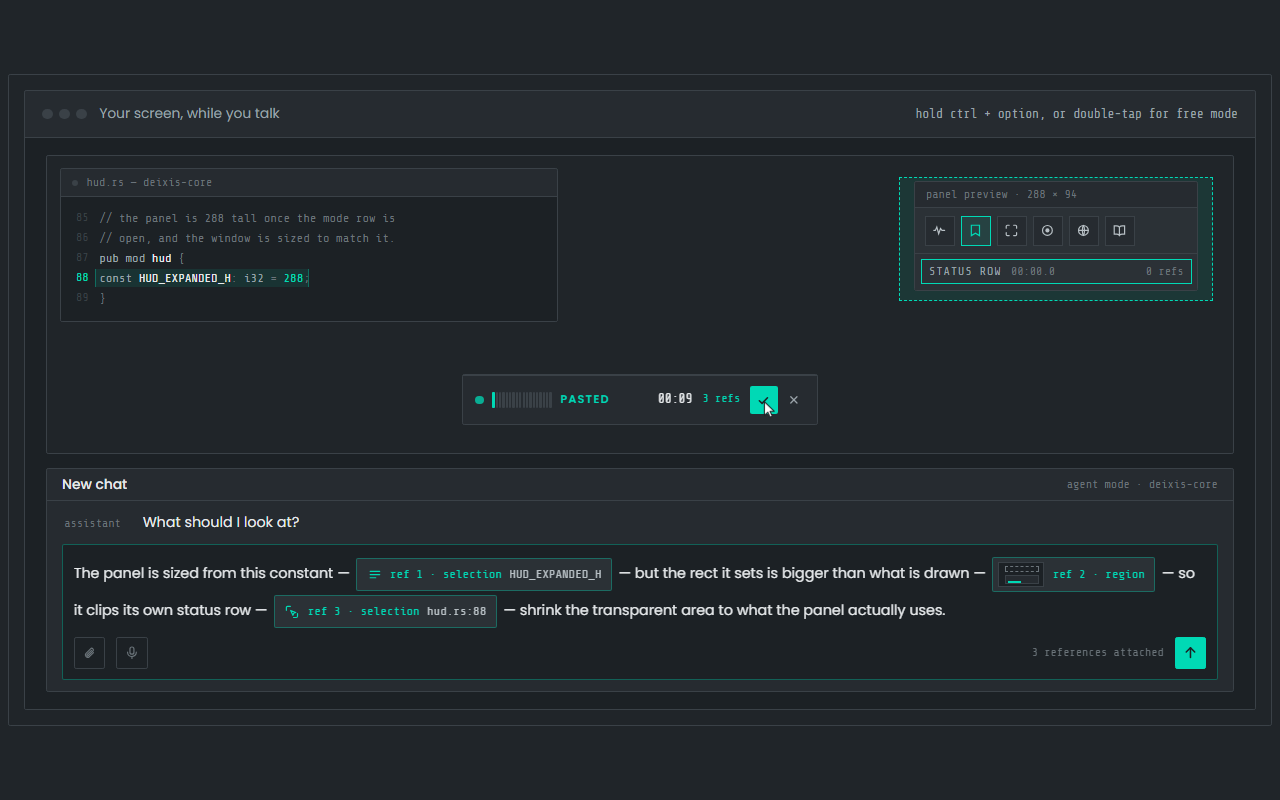
Dictation, where your cursor is
Hold Ctrl+Option, speak, release. Clean, punctuated text lands in whatever app has focus on your Mac, with your clipboard handed back.
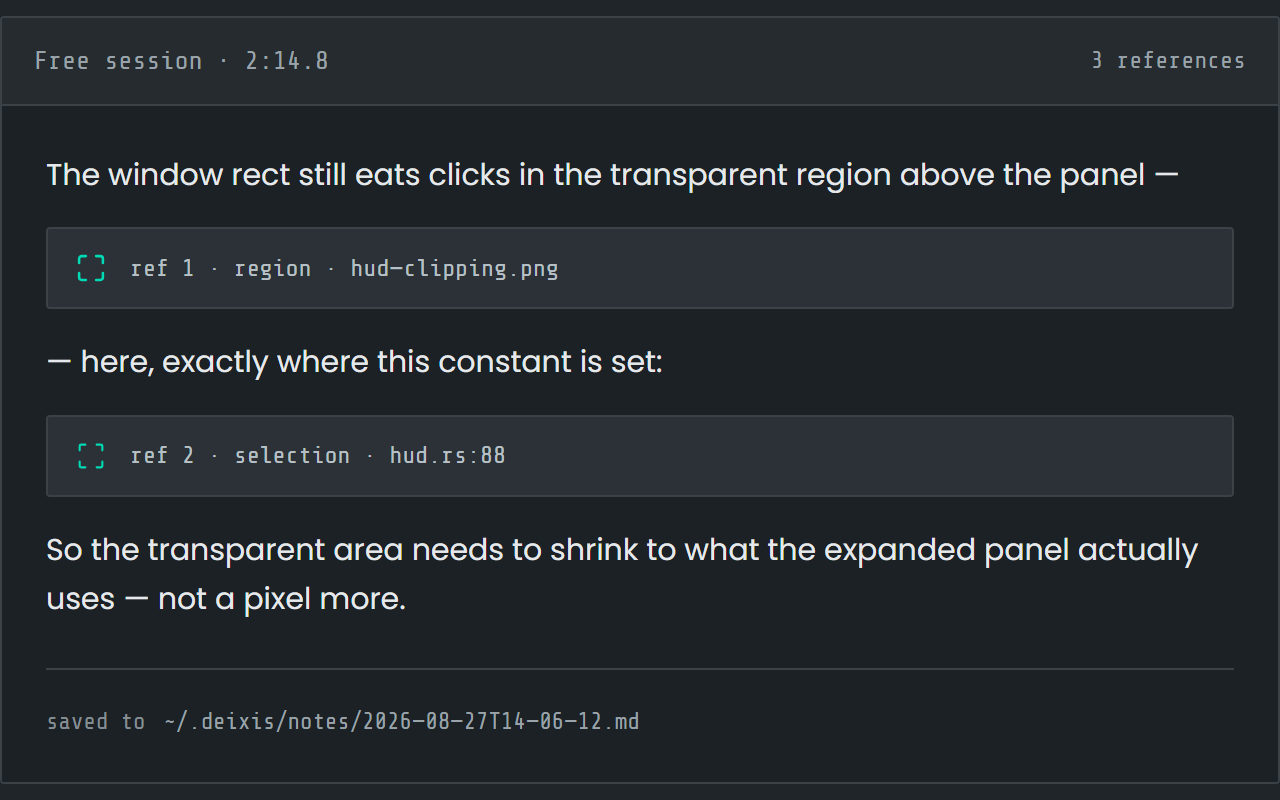
Free mode: talk and point
Double-tap the chord and narrate for as long as you like while you grab a region or take a selection. One note, what you said interleaved with what you pointed at, pasted where you finish and saved as Markdown.
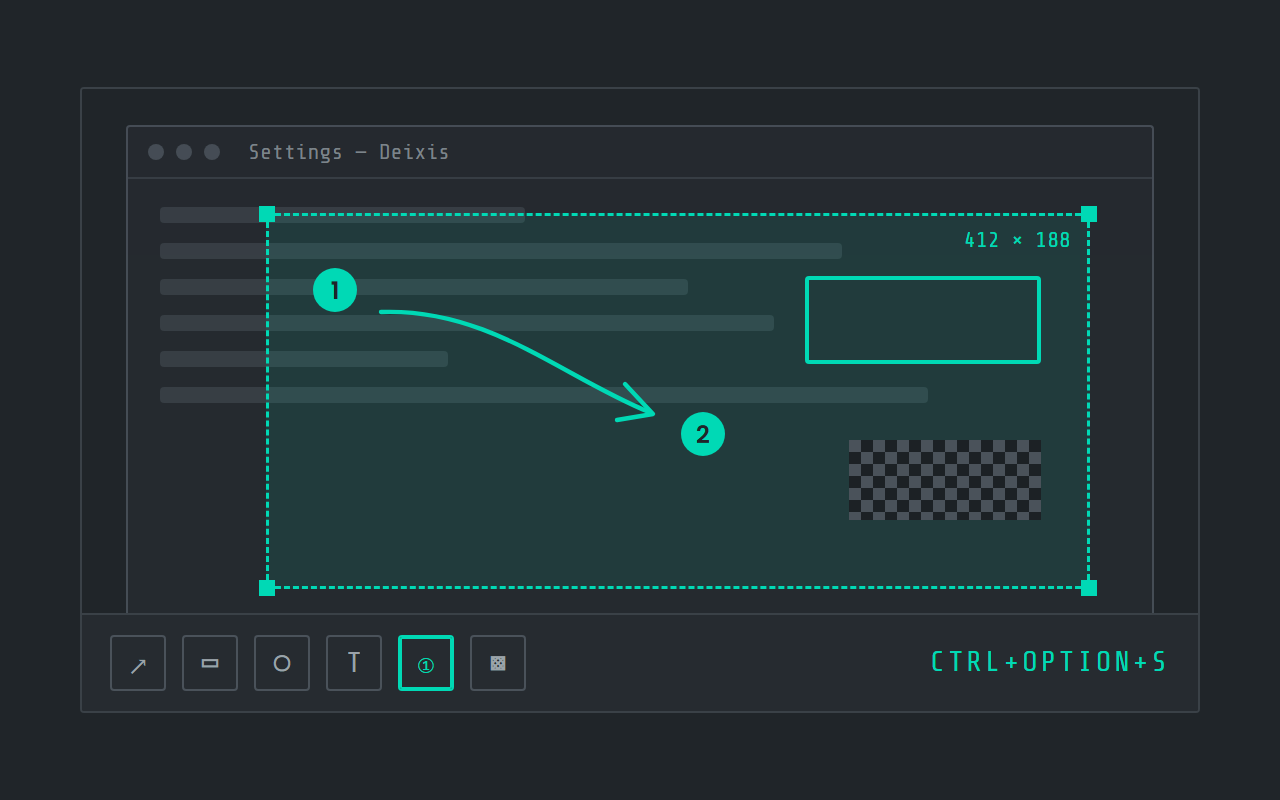
Screen grabs, annotated
Freeze the screen at the keypress, drag a region, add arrows, boxes, text and numbered steps, and pixelate what is private. Saved as a PNG in a folder you own.
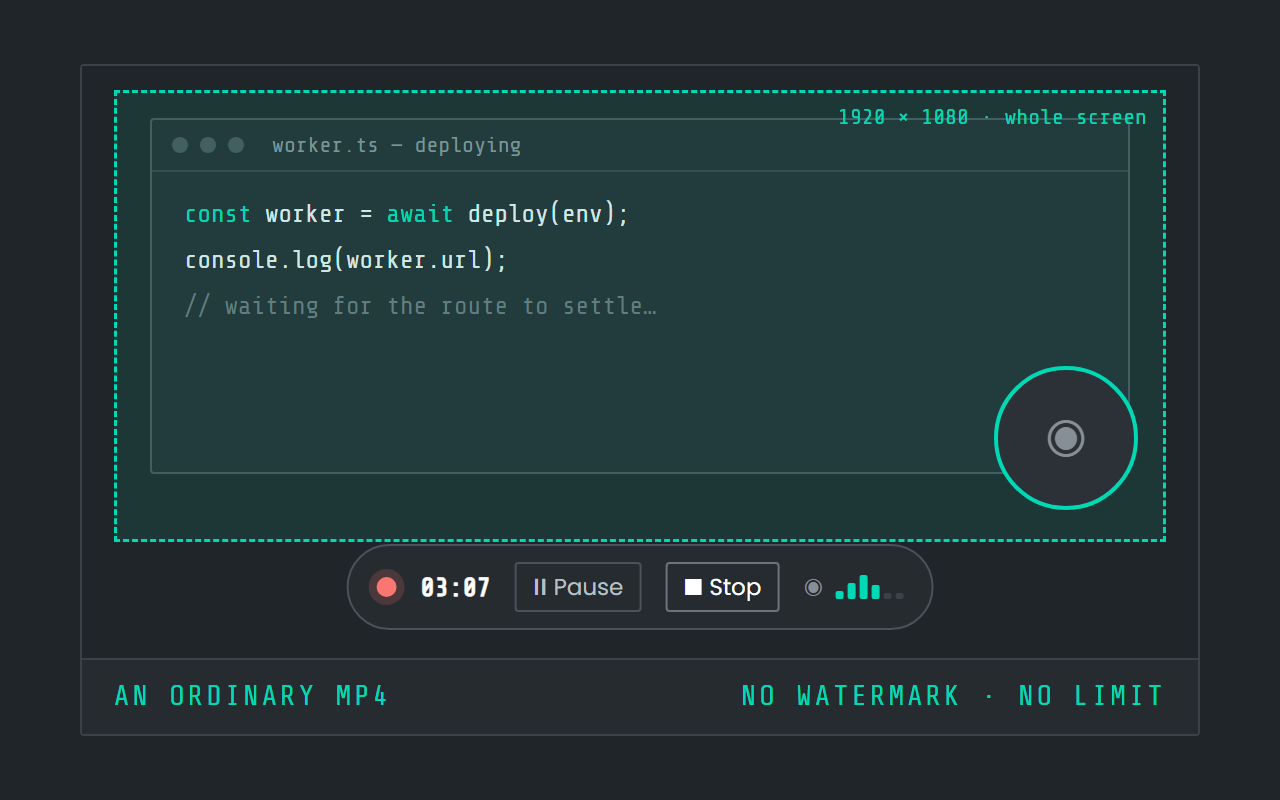
Screen recording
Record the screen, pause when you need to, and stop. The video is a file in a folder on your Mac, not in somebody else's cloud.
Side by side
Superwhisper and Deixis, side by side
| Row | Deixis | Superwhisper |
|---|---|---|
| Runs on | Mac, on Apple Silicon with macOS 13 or later, and the same app on Windows 10 and 11 and on Android, with an iPhone keyboard in beta on TestFlight. One engine on all of them, and dictation audio never leaves the device. | macOS, Windows, iOS, Android |
| Speech recognition happens | On your own device, inside the app, on every platform. Your audio never leaves it. | On your device or in the cloud, your choice |
| AI cleanup happens | On your device, with no provider at all. Or, if you want more, Deixis's cloud, your own Ollama, or your own key. Your choice, in one setting. | On your device or in the cloud, your choice |
| Leaves your machine | Text only, and only once you switch a cloud feature on. Never audio, never screenshots, never window titles. | Audio, text, window titles |
| Account needed | None, ever, for anything that runs on your device. The cloud extras have a seven-day trial you start with an email code. No card. | not documented |
| Price | Free forever for everything that runs on your Mac. Pro is $49 a year for the cloud extras with nothing to set up; on a Mac, that is cloud cleanup. | Free tier: a free plan that does not expire: unlimited dictation on any local Whisper model, custom vocabulary, text replacements and up to two modes, plus 3,000 words of Pro to try; $249.99 one-time; $8.49 a month; $84.99 a year |
| Your transcripts live | In plain files, in one folder you own and can back up. Uninstall Deixis and every note is still readable. | On your device |
| Make it yours | Your own dictionary of the names and jargon you use, in its own window. Custom buttons and webhooks are on Windows today, not yet on the Mac. | Custom modes with your own AI instructions and a choice of which context each one sees; your own AI keys on Pro; one Pro licence across unlimited Macs and Windows PCs plus an iPhone and an Android phone; a command line and an MCP server over your dictation history; enterprise single sign-on, rollout through Jamf or Intune, and model access control |
Superwhisper facts from superwhisper.com, its privacy policy, its docs, its Windows page, its Windows docs, its Pro docs, its voice-model docs, its language-model docs, its security docs, its compliance docs, its account docs, its Super Mode docs, its custom-mode docs, its meeting docs, its file-transcription docs, its context docs, its enterprise docs, its analytics docs, its history docs, its vocabulary docs, its quickstart docs and its CLI and MCP announcement, read on 27 September 2026. “Not documented” means those pages did not say.
What Superwhisper sends depends on the models you pick. On the free plan, which runs on its local Whisper models, its plans page says nothing you dictate leaves your device. Every AI mode runs on a language model, and every language model is Pro: the default, S1-Language, and the Anthropic, OpenAI and Groq models run in the cloud, and one local language model, S1-mini, runs on the device on macOS and Windows. Cloud voice models (Superwhisper's own or Deepgram, all Pro) receive the audio. The rows above describe the product as it is sold: Super Mode sends the window title and more to the language model. Pro is $8.49 a month, $84.99 a year or $249.99 once, and one licence covers unlimited Macs and Windows PCs plus an iPhone and an Android phone. The free plan has unlimited dictation on any local Whisper model, 75 MB to 3 GB, with custom vocabulary, text replacements and up to two modes; the Cohere Transcribe and Parakeet local models, AI modes, context awareness, realtime transcription, system audio recording and speaker separation are Pro. On a Mac it needs macOS 14 or later, and its site says Intel Macs work best with cloud models. Its Windows docs list FileSync, a custom app folder, hold-Shift-to-send, simulated keypresses and the coding-agent integrations as not yet available on Windows. Its home page and its plans page disagree about two tiers: the home page lists meeting recording under Free and file transcription under Pro, while the plans page lists file transcription as free and system audio recording as Pro, so neither file transcription nor meeting recording as such is put in a tier here. Its site names security certifications and a trust centre; this page does not repeat them because we have not seen the reports.
What leaves your machine, and what leaves theirs
Deixis publishes every byte it sends, as a table, because there is so little of it. Here is that table beside what Superwhisper's own pages say.
| What | Deixis | Superwhisper |
|---|---|---|
| Audio | Never. Recognition happens inside the app on your device; the recording, the model and the transcript stay there. | Nothing with a local voice model: the local Whisper models run on the device and the privacy policy says no audio is collected. With a cloud voice model — Superwhisper's own servers or Deepgram, all Pro — the audio goes out for transcription; its security docs say those providers keep nothing and do not train on it.Superwhisper's servers or Deepgram · only with a cloud voice model selected |
| The dictated text | The sentence you just dictated, your vocabulary, and your previous sentence in that fieldthe endpoint you chose · only with a cloud endpoint set, and by default only when the local rules are not enough | The transcript, whenever an AI mode runs on a cloud language model: Superwhisper's own S1-Language by default, or an Anthropic, OpenAI or Groq model, all of them Pro. Its one local language model, S1-mini, also Pro, keeps the text on the device on macOS and Windows.the provider of the language model you picked · on every dictation in an AI mode with a cloud language model |
| Context around the text | The names of the app and the field the text is going into. Never the window title, never a screenshot.the same endpoint · with that request | The active window's title and name, text from the active input field, selected text and recently copied text, plus the date, time, your full name and computer name. History shows the full prompt that went, so you can check.the provider of the language model you picked · in Super Mode, and in any mode with a context source on |
| Telemetry and analytics | None. No account, no telemetry, no analytics, no crash reports. | None, says the privacy policy: no usage data is collected. An enterprise dashboard, off by default until an owner turns it on, counts dictations, mode, model, duration, app version and platform — never audio or text.the vendor, enterprise plans only · only when an enterprise owner switches it on |
| Update check | Nothing but the request; the version check happens on your Macapi.deixis-voice.com · every launch, and when you ask in Settings | not documented |
| Model download | Nothing but the requesthuggingface.co · once, when you press Download on first run | A model download when you pick a local model: the Whisper models, 75 MB to 3 GB, are free; Cohere Transcribe (1.3 GB) and the Parakeet models (about 480 MB) are Pro. The docs do not say what the request carries.not stated · when you select a model |
| Account and sign-in | An email address, only if you choose to start the trial, plus the partner tag from a partner download link and the first partner website that connected to Deixis on this computer, if there are anythe Deixis endpoint · when you start the trial | A licence key for Pro, emailed at purchase and pasted into the app. The vendor holds your account's email address and billing records and says it never stores transcripts or audio; on deletion the address is obfuscated and the billing records kept in anonymised form.the vendor and its payment processor · on purchase and activation |
| Integrations | Nothing: webhooks are on Windows today, not yet on the Mac | Your modes, vocabulary and settings, if you turn on FileSync, which syncs configuration between your Macs through Superwhisper's servers; its docs say it never stores transcripts or audio.Superwhisper's servers · only with FileSync on |
Before you switch
Before you switch
Who should not switch
If your Mac has an Intel processor, stay with Superwhisper: Deixis will not run on it. Dictating in French, Japanese or any language but English? Deixis cannot follow you there. If you want a language model formatting every sentence and staying on the Mac, Superwhisper's S1-mini on Pro does that out of the box, where Deixis needs you to run the model yourself. If you record meetings or transcribe files on this Mac, Superwhisper does both and the Deixis Mac build does neither. And if your company rolls software out through Jamf with single sign-on, that is Superwhisper's enterprise tier.
Making the switch
Most of the switch is one download and a few permission prompts, and nothing to unlearn but a key.
Installing
Deixis installs the way Superwhisper does: open the download, a notarized disk image, and drag the app to Applications. On first launch, one Download button fetches the speech model. macOS then wants the two permissions Superwhisper needed, microphone and Accessibility, when you first dictate, and a third, Screen Recording, the first time you take a grab; all three live under System Settings → Privacy & Security. New versions come through Settings → Updates.
The shortcut
Superwhisper's quickstart has you press Option+Space to start and press it again to stop. Deixis
is hold-to-talk: hold Ctrl+Option while you speak and let go when you are done, which suits short
sentences and quick replies. For a longer stretch, double-tap the chord and it listens until you
double-tap again. The two shortcuts do not collide, so both apps can sit on the Mac while you decide.
Modes, as one setting
There is no list of modes to rebuild. The nearest thing to your Voice to Text mode is Settings → Cleanup set to Never: nothing goes out, and rules on your Mac do the tidying. Message mode's polish is Every time, where each sentence goes to a language model and you wait a moment longer for it. Between them sits the default, When it helps, which asks a model only when you dictate an instruction such as "make this a bullet list", or a long run that comes out unpunctuated. Super Mode's trick, fitting the words to the app in front of you, is done by the app and field names, with no window title and no name attached. The model behind all of it can be Deixis's cloud, one you run on your own Mac, or your own key.
Vocabulary and replacements
Superwhisper passes its vocabulary to the speech model as hints alongside the audio, and its replacements rewrite the result afterwards. The Deixis Dictionary window splits the same way. Its words to expect bias what the recogniser listens for, and its fixes are find-and-replace rules applied after it, for the name it will not stop mangling. Bring both lists over before anything else.
What you leave behind
Other languages, meeting mode, file transcription and the enterprise controls stay with Superwhisper. If you rely on one of those on this Mac, keep it for that job.
Before you ask
Questions people search for
Is Superwhisper free on a Mac?
There is a free plan that does not expire: unlimited dictation on its local Whisper models, a custom vocabulary, text replacements and up to two modes, after 3,000 words of Pro to try. Its AI modes, context awareness and language models are Pro, at $8.49 a month, $84.99 a year or $249.99 once. Deixis is free for everything that runs on your Mac, rules-based cleanup included.
Does Superwhisper send my dictation to the cloud?
It depends on the models you pick. On the free plan, which runs on its local Whisper models, its plans page says nothing you dictate leaves your device. A cloud voice model sends the audio, a cloud language model sends the transcript, and Super Mode adds the window title, your selection, recent clipboard text and your name. Deixis never sends audio, and its cleanup never sends the window title.
Does Deixis have modes like Superwhisper?
No. Instead of modes you build, Deixis looks at which app and which field the words are going into, so a terminal command, a chat reply and an email come out shaped differently with nothing to set up. One setting decides how often a language model is asked: when it helps, every time, or never.
Does Deixis run on an Intel Mac?
No. Deixis for the Mac is built for Apple silicon only, on macOS 13 or newer. Superwhisper does run on Intel Macs, and its own FAQ says it works best there with cloud models.
Is Deixis cheaper than Superwhisper Pro?
For the year, yes: Deixis Pro is $49 a year, or $10 a month, against Superwhisper's $84.99 a year or $8.49 a month. And much of what Superwhisper charges for is free in Deixis, cleanup included, with your own provider key making the cloud cleanup free as well.
Can I keep everything on my Mac with Deixis?
Yes. Speech recognition always runs on the Mac and the audio is never uploaded. Set up no model, or set cleanup to never ask one, and no text leaves either; or point it at a model running on your own Mac. Only the update check and the announcement check go out on their own, and neither carries anything but the request.
Keep reading
Related pages
How to type by voice in any app on a Mac, with the speech recognised on the Mac itself
How to type by voice in any app on a Mac: hold Ctrl+Option, speak, let go. Speech recognition runs on your Mac, free and with no account.
Here is every byte that leaves your machine, for each tool
Every byte Deixis sends off your machine in one table, and the same table filled in for other dictation tools from their own documentation, dated.
Wispr Flow, or dictation your Mac keeps to itself
Wispr Flow transcribes in the cloud and, on a Mac, can send a screenshot with each dictation. Deixis dictates on your Mac itself, free, with no account.
VoiceInk or Deixis, two local dictation apps for your Mac
VoiceInk and Deixis both recognise speech on your Mac. VoiceInk is $25 and needs macOS 14.4; Deixis is free for everything local and runs on macOS 13.
Apple Dictation, and what Deixis adds on the same Mac
Apple Dictation is free and built into your Mac. Deixis adds tidier text on any Apple silicon Mac, your own words, and grabs and recording on one key.
Willow Voice, or the same hotkey with the cloud left out
Willow Voice dictates through its cloud unless you pay for offline mode. Deixis recognises speech on your Mac for free, with no account and no weekly cap.

Hold a key. Speak. Keep working.
Deixis is free, needs no account, and runs on your own device. Everything on this page is in the current release.
v1.2.2 · 64‑bit Windows 10/11 · macOS 13 on Apple silicon · 51 MB · nothing else to install · also for Windows
Facts about Superwhisper checked on 2026-09-27 against superwhisper.com. Deixis facts are from its README for the current release. Something out of date? Tell us.