Apple Dictation, and what Deixis adds on the same Mac
Every Mac already has Dictation. Press the Microphone key or the Dictation shortcut, talk, and the words appear where you were typing. It costs nothing, Apple maintains it, and Apple's guide for macOS Sonoma says that on an Apple silicon Mac, in a supported language, the speech is processed on the Mac itself. For a quick reply it is a perfectly good tool, and this page will not pretend otherwise.
Deixis is for the point where you dictate for real: long emails, documents, chat threads and
prompts, where you want the text to arrive finished. Hold Ctrl+Option, speak, let go, and it is
typed at the cursor of whatever app is in front, with the filler words dropped, your own names
spelled your way and your clipboard put back afterwards, and, when a language model is asked to
help, punctuation that suits the field it lands in. Double-tap the chord instead and you can talk
while you grab parts of the screen, all of it coming out as one note.
It runs on the same Apple silicon Mac, on macOS 13 or later. The speech is recognised on the Mac, the audio of your dictation never leaves it, there is no account, and everything that runs on the Mac is free. Here is where each of the two is the better choice.
Why switch
What you gain, and what you give up
Why Deixis
- Text that arrives finished, on any Apple silicon Mac. Deixis drops filler words, applies your fixes and tidies the casing with rules that run on your Mac, on every Apple silicon Mac from macOS 13 on, with nothing sent anywhere. Apple's Auto-punctuation inserts commas, periods and question marks; the polish Apple announced for macOS 27 needs an M3 or later with at least 12GB of memory. An M1 or M2 Mac, or one with less memory, gets Deixis's cleanup in full.
- Punctuation that suits the field. A commit message, an email and a chat reply read differently. When Settings → Cleanup hands a sentence to a language model, Deixis tells it which app and which field the text is going into, so it comes back punctuated for where it lands; nothing in Apple's Dictation guide changes with the app you are in. The model can be Deixis's cloud, one on your own Mac or your own key, and what leaves for a cloud model is text, never audio and never the window title.
- Your words, spelled your way. Apple's Dictation guide documents no list of your own words: a wrong word is fixed by clicking an alternative, or by typing or dictating it again. Deixis has a Dictionary window for the names, products and jargon you use, and fixes for anything it keeps mishearing, applied to every sentence after.
- Talk and point, in one note. Double-tap
Ctrl+Optionfor free mode and narrate for as long as you like. Tap the chord for the toolbar to take the text you have selected or grab a region of the screen, then finish. What you said and what you pointed at come out as one note, interleaved, pasted at the caret and saved as a Markdown file: a bug report, review notes or instructions for somebody else, in one pass. - Grabs and recordings on the key you already use. The Mac's own Screenshot tool, on
Shift-Command-5, takes pictures and recordings of the screen, and it is good. What Deixis adds is
that they sit on the dictation chord.
Ctrl+Option+Sfreezes the screen for a grab you can annotate with arrows, boxes, text and numbered steps, and pixelate where something is private;Ctrl+Option+Vrecords the screen to a video file on your Mac, and the same chord stops it. - An answer about your voice that does not depend on your Mac. Apple's guide asks you to look in Keyboard settings to see whether your dictation is processed on the Mac, and leaves search boxes out of that answer. Its privacy page adds that Siri and Dictation may send contextual data such as contact names and the names of your apps, under a random identifier rather than your Apple Account. With Deixis the answer is the same on every Mac it runs on: the audio of your dictation never leaves, the only content that can is text once you switch cloud cleanup on, and a fresh install makes two calls of its own, an update check and an announcement check, each carrying nothing but the request.
- The same tool on your other machines. If you also work on a Windows PC or carry an Android phone, Deixis is there too, with the same on-device recognition: the full desktop app on Windows, and on Android a floating microphone bubble that dictates into any app. Both of those also record and transcribe meetings, which the Mac build does not do yet.
Where Apple Dictation still wins
- It is already there, and it costs nothing. Dictation is part of macOS: switch it on under Keyboard in System Settings and start it with the Microphone key, a shortcut you choose, or Edit → Start Dictation. There is nothing to install and nothing new to trust. Deixis is a disk image to open and a speech model to download, which is two steps more than none.
- Languages. Apple's feature list names 63 language and region variants for Dictation, from Arabic to Vietnamese, and 48 with on-device processing. Deixis ships English speech models only.
- You can keep typing while it listens. On an Apple silicon Mac, Apple's guide says you can use the keyboard in the middle of dictating without stopping, and that you can dictate text of any length without a timeout; it stops on its own after 30 seconds of silence. Deixis types what you said when you let go of the chord, a sentence or a paragraph at a time.
- A spoken command for every symbol. Apple's command reference covers punctuation by name, symbols and currency, "caps on" and "all caps", "no space on", new line and new paragraph, and emoji by name in some languages. Deixis punctuates and capitalises for you rather than taking symbols by name.
- A second guess on the spot. When a word is ambiguous, Apple underlines it in blue, "flour" where you meant "flower", and a click offers the alternatives. Deixis fixes a word for good once it is in your dictionary, but it does not offer alternatives in place.
- The newest Macs get more. On macOS 27, a Mac with M3 or later and at least 12GB of unified memory gets what Apple calls more advanced dictation, which Apple says captures what you say as polished text, handling capitalisation, punctuation and formatting as you speak. Apple lists it for English.
What you get
More than dictation, on your Mac.
Hold Ctrl+Option and speak, or press a letter while you hold it: free mode, a grab, a screen recording. All of it on your Mac, all of it free, none of it behind an account.
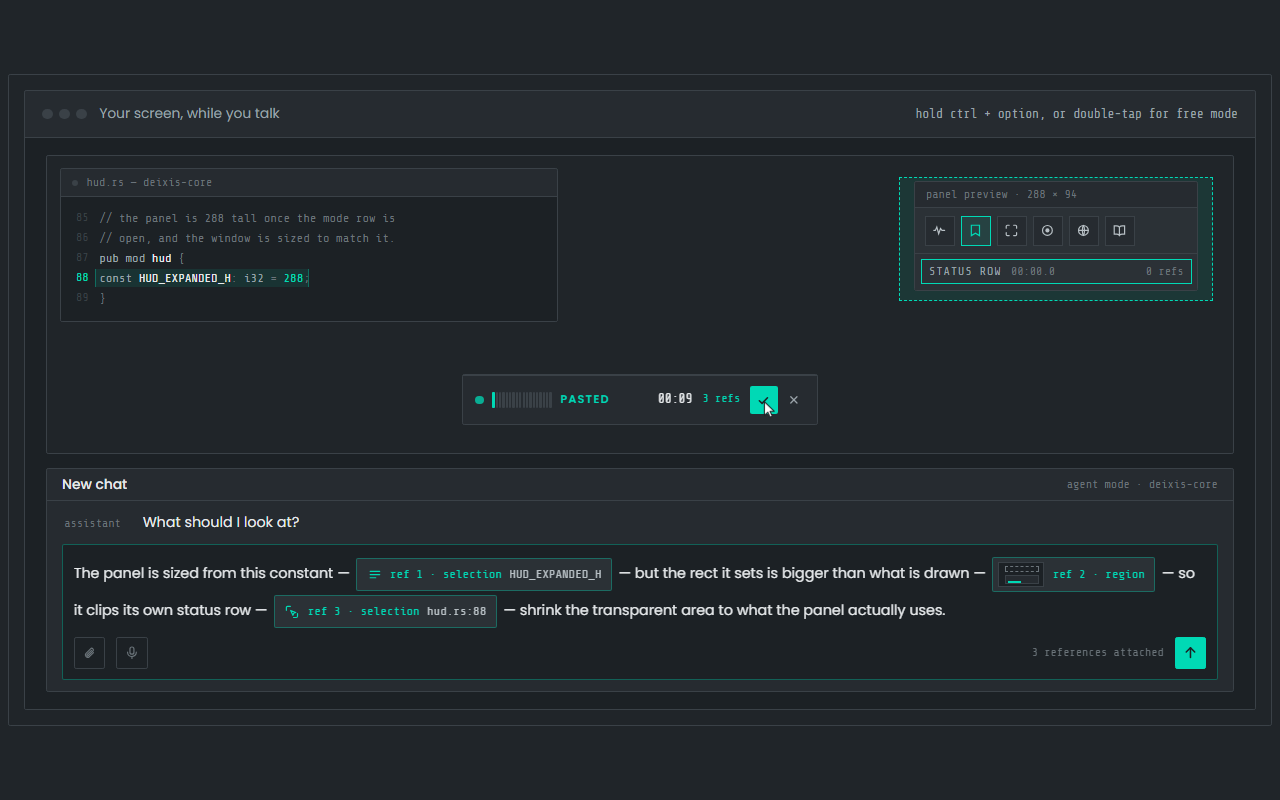
Dictation, where your cursor is
Hold Ctrl+Option, speak, release. Clean, punctuated text lands in whatever app has focus on your Mac, with your clipboard handed back.
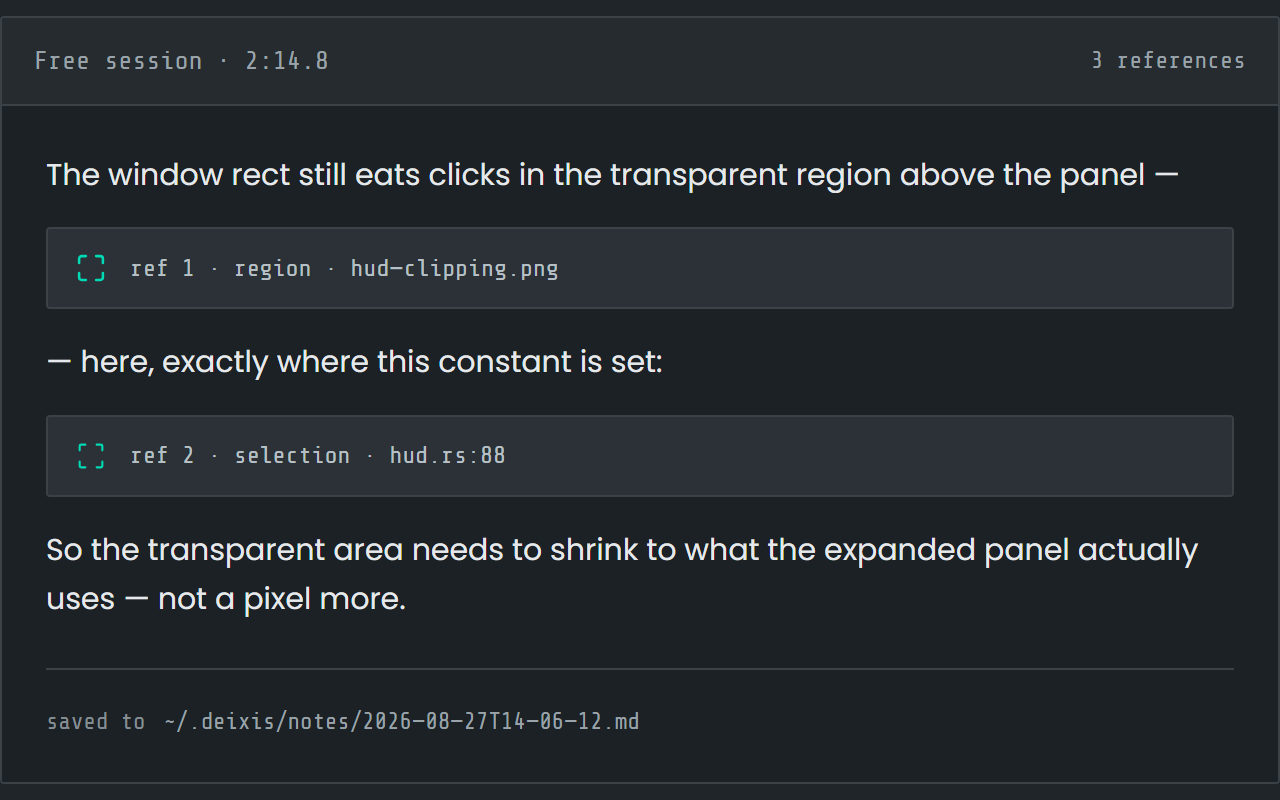
Free mode: talk and point
Double-tap the chord and narrate for as long as you like while you grab a region or take a selection. One note, what you said interleaved with what you pointed at, pasted where you finish and saved as Markdown.
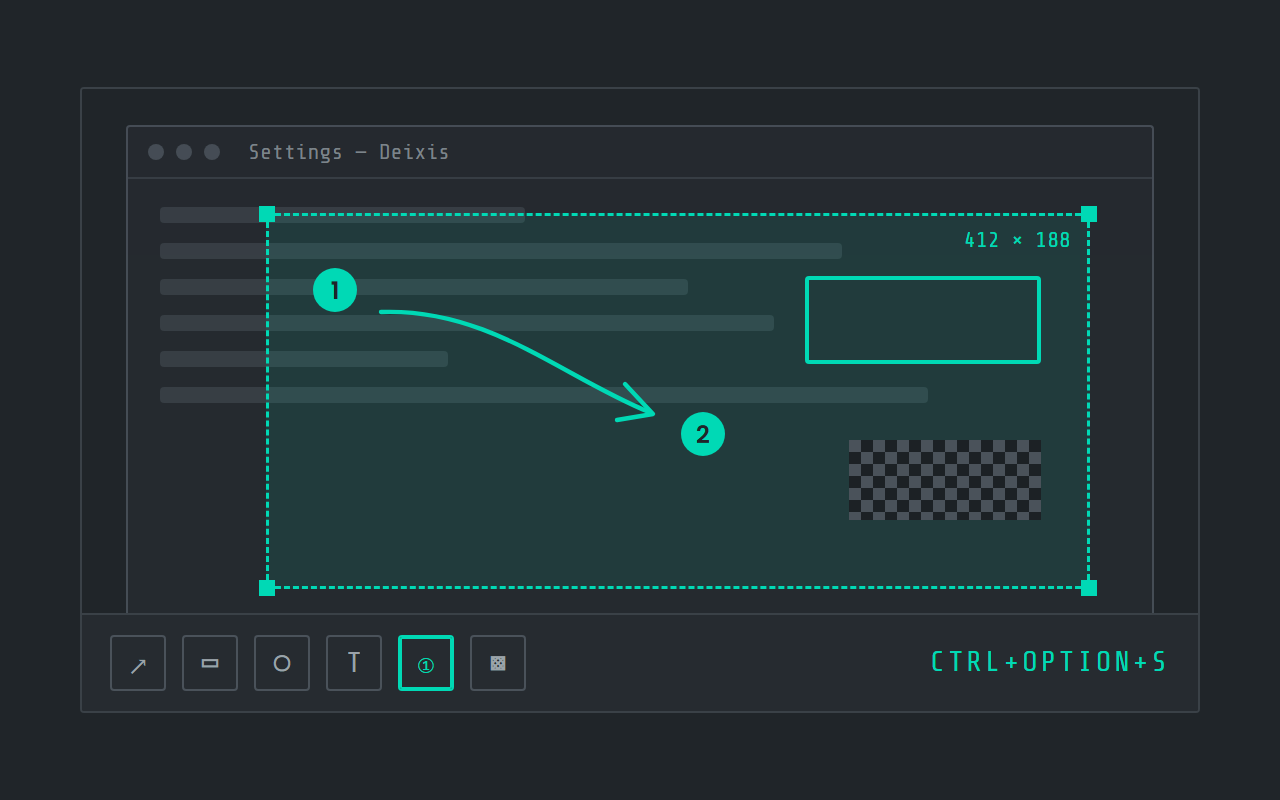
Screen grabs, annotated
Freeze the screen at the keypress, drag a region, add arrows, boxes, text and numbered steps, and pixelate what is private. Saved as a PNG in a folder you own.
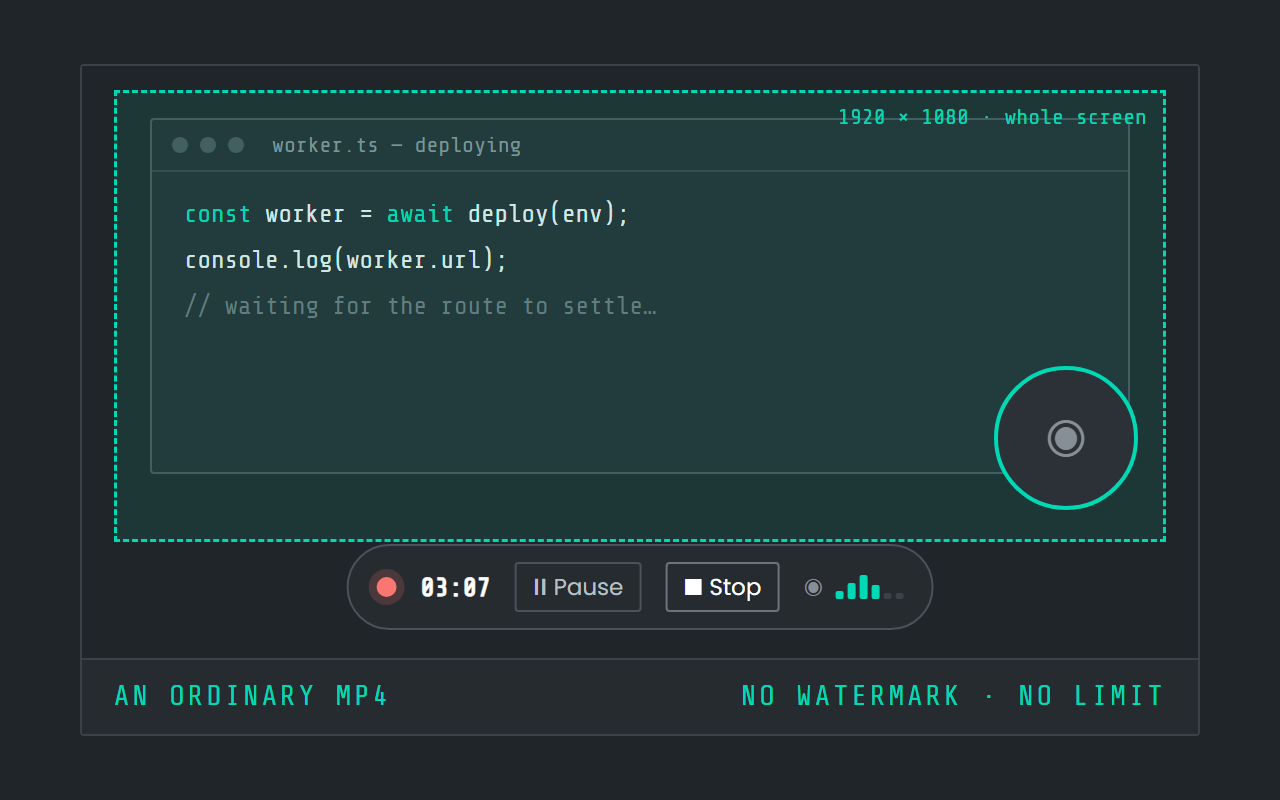
Screen recording
Record the screen, pause when you need to, and stop. The video is a file in a folder on your Mac, not in somebody else's cloud.
Side by side
Apple Dictation and Deixis, side by side
| Row | Deixis | Apple Dictation |
|---|---|---|
| Runs on | Mac, on Apple Silicon with macOS 13 or later, and the same app on Windows 10 and 11 and on Android, with an iPhone keyboard in beta on TestFlight. One engine on all of them, and dictation audio never leaves the device. | macOS |
| Speech recognition happens | On your own device, inside the app, on every platform. Your audio never leaves it. | On your device or in the cloud, depending on the device and the language |
| AI cleanup happens | On your device, with no provider at all. Or, if you want more, Deixis's cloud, your own Ollama, or your own key. Your choice, in one setting. | On your device |
| Leaves your machine | Text only, and only once you switch a cloud feature on. Never audio, never screenshots, never window titles. | Audio, text |
| Account needed | None, ever, for anything that runs on your device. The cloud extras have a seven-day trial you start with an email code. No card. | not documented |
| Price | Free forever for everything that runs on your Mac. Pro is $49 a year for the cloud extras with nothing to set up; on a Mac, that is cloud cleanup. | Free tier: included with macOS |
| Your transcripts live | In plain files, in one folder you own and can back up. Uninstall Deixis and every note is still readable. | On your device |
| Make it yours | Your own dictionary of the names and jargon you use, in its own window. Custom buttons and webhooks are on Windows today, not yet on the Mac. | A choice of languages, microphone and start shortcut, Auto-punctuation on or off, and spoken commands for punctuation, symbols, capitals, spacing and new lines. Apple's Dictation guide documents no list of your own words and no integrations. |
Apple Dictation facts from its docs, its privacy policy, its Improve Siri and Dictation page, its macOS Sonoma guide, its language list, its macOS 27 announcement, its command reference, its Keyboard settings guide and its Screenshot guide, read on 27 September 2026. “Not documented” means those pages did not say.
Where the speech is recognised depends on the Mac and the language. Apple's guide for macOS Sonoma says that on a Mac with Apple silicon, dictation is processed on the device for supported languages with no internet connection required, that what you dictate into a search box may be sent to the search provider, and that on an Intel-based Mac, or in a language without on-device support, your dictation is sent to Apple. The current guide says Keyboard settings shows which applies on your Mac. Apple's language list names 63 language and region variants for Dictation and 48 for on-device dictation, English among them, which requires a download of speech models. On macOS 27, a Mac with M3 or later and at least 12GB of unified memory also gets what Apple calls more advanced dictation, listed for English, which Apple says captures speech as polished text, handling capitalisation, punctuation and formatting as you speak; that on-device model is what the cleanup row above describes.
What leaves your machine, and what leaves theirs
Deixis publishes every byte it sends, as a table, because there is so little of it. Here is that table beside what Apple Dictation's own pages say.
| What | Deixis | Apple Dictation |
|---|---|---|
| Audio | Never. Recognition happens inside the app on your device; the recording, the model and the transcript stay there. | Your voice, unless Keyboard settings shows that your Mac processes dictation on the device. Apple's privacy page says that otherwise what you dictate is sent to and processed on Apple's servers, and is not stored unless you opt in to Improve Siri and Dictation.Apple's servers · whenever your Mac does not process dictation on the device, which Keyboard settings shows |
| The dictated text | The sentence you just dictated, your vocabulary, and your previous sentence in that fieldthe endpoint you chose · only with a cloud endpoint set, and by default only when the local rules are not enough | What you dictate into a search box. Apple's guide for macOS Sonoma says dictated text may be sent to the search provider to process the search, and the current guide leaves search boxes out of its on-device statement.the search provider · when you dictate into a search box |
| Context around the text | The names of the app and the field the text is going into. Never the window title, never a screenshot.the same endpoint · with that request | Other contextual data, which Apple's privacy page says Siri and Dictation may send: contact names, nicknames and relationships, the names of your devices, and the names of apps installed on your device, among others. It is associated with a random, device-generated identifier that is not tied to your Apple Account. With Location Services on for Siri, your location at the time of a request is sent too.Apple · when you use Siri and Dictation |
| Telemetry and analytics | None. No account, no telemetry, no analytics, no crash reports. | Related request data, which Apple's privacy page says it stores: the category of request and whether it succeeded, device specifications and configuration, and performance statistics, under a random identifier that rotates multiple times an hour and is not tied to your Apple Account, for up to two years. If you opt in to Improve Siri and Dictation, Apple may also store the audio of your dictation and review a sample of it; only Apple employees review audio.Apple · when you use Siri and Dictation; the audio only if you choose Share Audio Recordings, or turn on Improve Siri & Dictation later |
| Update check | Nothing but the request; the version check happens on your Macapi.deixis-voice.com · every launch, and when you ask in Settings | not documented |
| Model download | Nothing but the requesthuggingface.co · once, when you press Download on first run | A download of speech models for each language that supports on-device dictation. Apple's language list says on-device dictation requires it, and Keyboard settings lets you remove a language you downloaded.not stated · when you add a dictation language that supports on-device processing |
| Account and sign-in | An email address, only if you choose to start the trial, plus the partner tag from a partner download link and the first partner website that connected to Deixis on this computer, if there are anythe Deixis endpoint · when you start the trial | Nothing tied to your Apple Account. Apple's privacy page says Siri and Dictation data is associated with a random, device-generated identifier rather than your Apple Account or email address.— · — |
| Integrations | Nothing: webhooks are on Windows today, not yet on the Mac | not documented |
Before you switch
Before you switch
Who should not switch
Stay with Apple Dictation if you dictate in any language other than English: Apple's list is long, and Deixis's speech models are English. Stay with it if your Mac has an Intel processor or runs a version of macOS older than 13, because Deixis needs Apple silicon and macOS 13 or later. If you like to keep typing while the words go in, or you rely on saying "caps on" and "new paragraph", Apple's way of working will suit you better. If you want to control the whole Mac by voice, that is Apple's Voice Control, not a dictation tool. And if you only ever dictate a line or two, and you have checked Keyboard settings and are happy with what it tells you, the built-in feature is enough: it is already there and asks nothing of you.
Making the switch
Nothing to migrate: Apple's guide describes no word list to export. And nothing to give up, since the two start on different keys and you can keep both.
The key
Apple's Dictation starts on the Microphone key, the shortcut you picked in Keyboard settings, or
Edit → Start Dictation, and stops on Escape, the same key again, or 30 seconds of silence. Deixis
is a hold: hold Ctrl+Option, speak, release, and the text is typed when you let go. Double-tap
the chord for free mode, which keeps listening until you double-tap again, then pastes the finished
note at the caret, leaves it on the clipboard and saves it. If Control and Option are already
spoken for on your Mac, Settings → Hotkey records a new chord as you press it.
Installing
Open the notarized disk image and drag Deixis to Applications. On first launch, one Download button fetches the English speech model; until it finishes there is no model, and Deixis says so rather than failing quietly. The first time you dictate, macOS asks for Accessibility and microphone permission: grant both in System Settings → Privacy & Security. Updates are checked in Settings → Updates.
Punctuation and cleanup
Apple's Auto-punctuation becomes Deixis's rules, on by default and running on your Mac: fillers dropped, your fixes applied, sentences cased. Settings → Cleanup decides when a language model is asked as well, and the model is what shapes a sentence for the field it lands in. When it helps, the default, keeps most sentences on your Mac and calls a model only when you ask for a change ("make this a bullet list") or dictate a long stretch with no punctuation; Every time sends each sentence for better prose; Never keeps dictation to rules. With nothing configured, it is rules only and no text leaves.
Your words
Open the Dictionary window and add the names and terms Apple kept guessing at. Words to expect are the names and jargon the recogniser should listen for; Fixes are corrections applied after recognition, for anything it still mishears; Filler words adds your own to the ones it already strips. What you dictate is kept in the History window, on your Mac.
Grabs and recordings
Ctrl+Option+S for a grab, Ctrl+Option+V for a screen recording, and the same chord again to
stop and save it. Shift-Command-5 keeps working exactly as before. Deixis's grabs and recordings
land as ordinary files in a folder on your Mac, which you can open with anything.
Before you ask
Questions people search for
Is Apple Dictation private?
It depends on your Mac and your language, and Apple says so. Its guide for macOS Sonoma says an Apple silicon Mac processes dictation on the device for supported languages; otherwise what you dictate is sent to Apple's servers, and Apple's privacy page says it is not stored there unless you opt in to Improve Siri and Dictation. Keyboard settings shows which applies to you. Deixis recognises speech on your Mac under every setting.
Does Apple Dictation work offline?
On an Apple silicon Mac in a supported language, yes: Apple's Sonoma guide says no internet connection is required. On an Intel-based Mac, or in a language without on-device support, your dictation is sent to Apple to be processed. Deixis dictates with the network off on every Mac it runs on, once its speech model is downloaded.
Can I add custom words to Apple Dictation?
Apple's Dictation guide documents no word list. When a word is ambiguous, Apple underlines it in blue and a click offers alternatives; otherwise you type or dictate the correct word yourself. Deixis has a Dictionary window for your names and jargon, plus fixes for the words it keeps mishearing.
Does Apple Dictation remove filler words?
Apple's pages do not say either way. They say Auto-punctuation inserts commas, periods and question marks in supported languages, and that on macOS 27 a Mac with M3 or later and at least 12GB of memory captures speech as polished text, with capitalisation, punctuation and formatting handled. Deixis drops filler words by rule, on the Mac, on every Apple silicon Mac it runs on.
Is Deixis free like Apple Dictation?
Yes, for everything that runs on your Mac: dictation, free mode, the dictionary, screen grabs and screen recording, with no account. Pro, at $49 a year or $10 a month, runs cloud cleanup for you with no key to obtain. With your own provider key, cloud cleanup costs nothing from Deixis.
Can I use Apple Dictation and Deixis on the same Mac?
Yes. They start on different keys: Apple's on the Microphone key or its own shortcut, Deixis's on
Ctrl+Option. Keep Apple's for a line in a language Deixis does not speak, and use Deixis for what
you write in English.
Keep reading
Related pages
How to type by voice in any app on a Mac, with the speech recognised on the Mac itself
How to type by voice in any app on a Mac: hold Ctrl+Option, speak, let go. Speech recognition runs on your Mac, free and with no account.
Here is every byte that leaves your machine, for each tool
Every byte Deixis sends off your machine in one table, and the same table filled in for other dictation tools from their own documentation, dated.
Willow Voice, or the same hotkey with the cloud left out
Willow Voice dictates through its cloud unless you pay for offline mode. Deixis recognises speech on your Mac for free, with no account and no weekly cap.
Aqua Voice, or dictation that works with the Wi-Fi off
Aqua Voice says it has no offline mode and gives you 1,000 free words. Deixis recognises speech on your Mac itself, free, with no account and no meter.
MacWhisper transcribes your files. Deixis types where your cursor is.
MacWhisper is a transcription app first. Deixis is dictation first: hold Ctrl+Option on your Mac and clean text lands at the cursor, free, no account.
Superwhisper or Deixis on your Mac: the models, the price and what leaves
Superwhisper puts its AI modes and every language model on Pro. Deixis tidies your dictation on your Mac for free, and never sends your window title.

Hold a key. Speak. Keep working.
Deixis is free, needs no account, and runs on your own device. Everything on this page is in the current release.
v1.2.2 · 64‑bit Windows 10/11 · macOS 13 on Apple silicon · 51 MB · nothing else to install · also for Windows
Facts about Apple Dictation checked on 2026-09-27 against support.apple.com. Deixis facts are from its README for the current release. Something out of date? Tell us.