Dictation for Terminal and iTerm2 on a Mac
The terminal on a Mac has quietly turned into a place you write. A coding agent in one pane is waiting for a paragraph of instructions. Git is waiting for a message. A setup script has stopped to ask a question. The commands are still short and full of symbols, but the words around them are prose, and prose is the part that is quicker said than typed.
Deixis is voice input for that part. Hold Ctrl+Option, say it, let go, and punctuated text lands
at the prompt in the Terminal tab or iTerm2 pane you were already in, with your clipboard put back
the way you left it. The speech is recognised on your Mac, the audio never leaves it, and nothing
asks you to sign in.
It is not a Terminal feature or an iTerm2 plugin, so there is nothing to add to a profile and no shell configuration to touch. Deixis types at the caret of whatever has focus, which means the same chord works in your editor, your browser, your notes and your chat as well.
Why Deixis
What it gives you in Terminal and iTerm2, and what it will not do
Why Deixis in Terminal and iTerm2
- Prompts at the speed you think them. An agent does its best work with context — which file, what you already tried, what it must not touch — and context is exactly what nobody bothers to type. Said aloud it takes seconds, and it arrives as sentences with a question mark where you asked a question, not as one long line.
- Your voice stays on the Mac. Recognition runs inside Deixis on your own Mac. The recording, the model and the transcript stay local under every setting and on every plan, with no account and no telemetry. Once the speech model is downloaded, dictation works with the network switched off.
- It punctuates, and rewords only when you ask. A long prompt comes back as sentences, a commit line gets a capital and a full stop, and a short answer stays short. With nothing configured, that is rules on your Mac — the "um" out, the capital in, the full stop on — and nothing is sent. Set up a cleanup model and it is told the app and field too, never the window title.
- Your stack, spelled your way. SwiftUI,
kubectl,shadcnand the name of your own service come out the way you write them, corrected on your Mac before anything is sent anywhere. The software vocabulary pack is on from the start, and your own words go into the Dictionary window. - Talk and point in one go. Double-tap
Ctrl+Optionfor free mode and talk for as long as you need. While it listens, tap the chord for the toolbar: take the text you have selected — a stack trace, a failing test's name — or grab a region of the screen. What you said and what you pointed at come out as one note, pasted where you finish and saved as Markdown. - Grabs and recordings on the same chord.
Ctrl+Option+Sfreezes the screen so you can drag a region and mark it up with arrows, boxes, numbered steps and a pixelate tool for anything private.Ctrl+Option+Vrecords the screen to a video file, and the same chord stops it. Both are files in a folder on your Mac. - Free, with nothing to sign in to. Everything that runs on your Mac costs nothing: dictation, the speech model, the dictionary, free mode, grabs and screen recording.
What it will not do
- It is not a keyboard replacement. Flags, paths, pipes and quotes are faster typed, and a command said aloud comes back as a sentence with a capital letter, which is not what zsh wants. Say the words; type the switches.
- It does not follow your session. Deixis types what you say and nothing more, so it cannot act on what the last command printed or answer what the agent asked. You still have to say what you mean, and none of the terminal's output is sent anywhere.
- It does not drive the Mac by voice. There is no "new tab" or "scroll up". You hold the chord when you have a sentence to say, and it stays out of the way the rest of the time.
- English only. The speech model is an English model, so prompts and commit messages in another language need another tool.
- Apple silicon and macOS 13 or later. There is no build for an Intel Mac. iTerm2 itself runs back to macOS 10.14, so an older Mac can have the terminal and not Deixis.
- The Windows extras are not here yet. On Windows, a palette button can run your script and type its output back at the prompt, and finished notes can go to a webhook of your own. Neither is on the Mac today, and nor are meeting recording and translation, which run on Windows and Android.
What you get
More than dictation, on your Mac.
Hold Ctrl+Option and speak, or press a letter while you hold it: free mode, a grab, a screen recording. All of it on your Mac, all of it free, none of it behind an account.
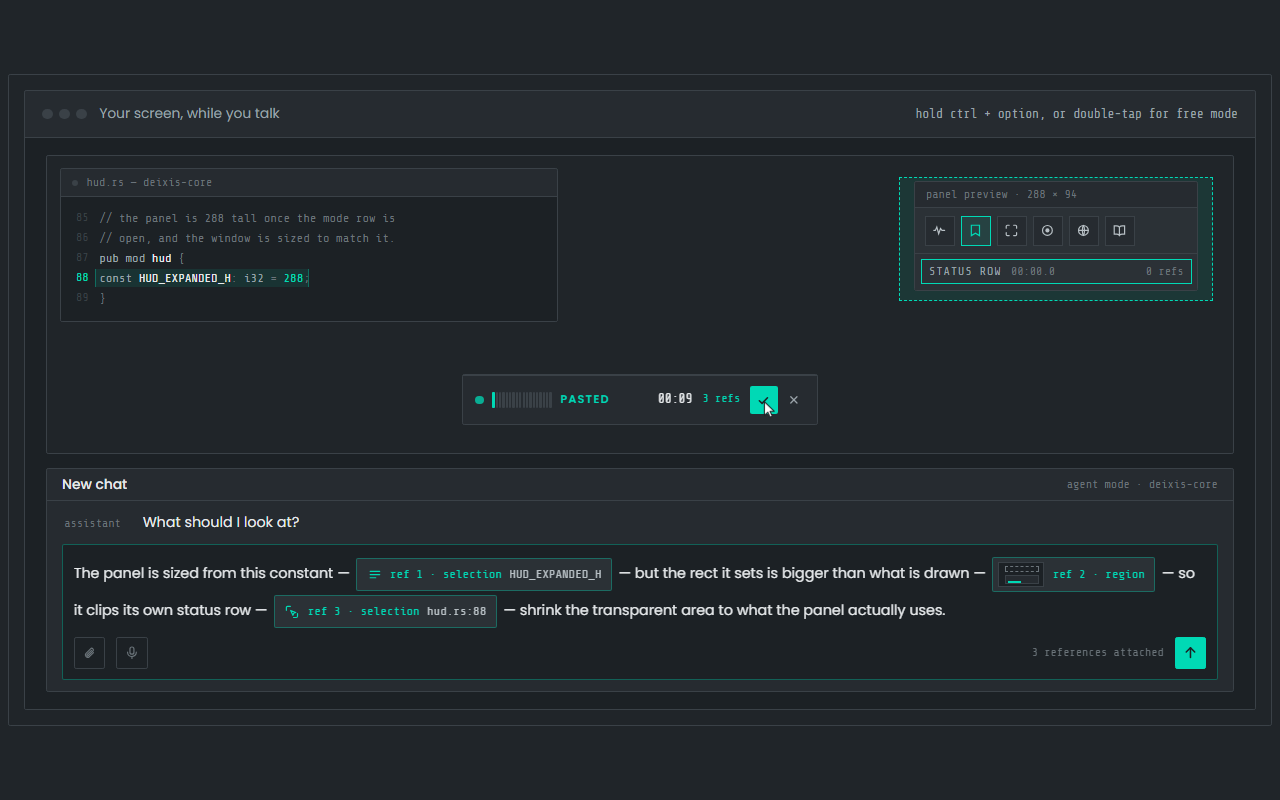
Dictation, where your cursor is
Hold Ctrl+Option, speak, release. Clean, punctuated text lands in whatever app has focus on your Mac, with your clipboard handed back.
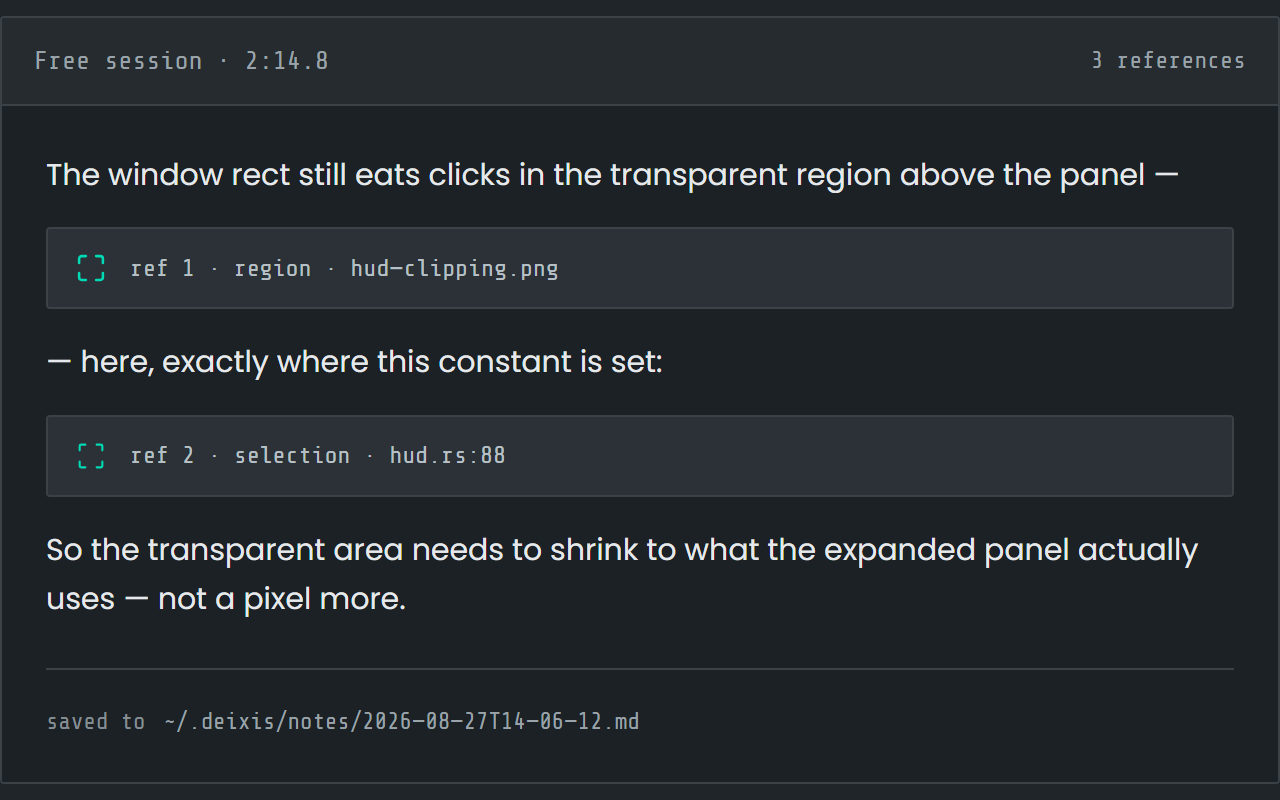
Free mode: talk and point
Double-tap the chord and narrate for as long as you like while you grab a region or take a selection. One note, what you said interleaved with what you pointed at, pasted where you finish and saved as Markdown.
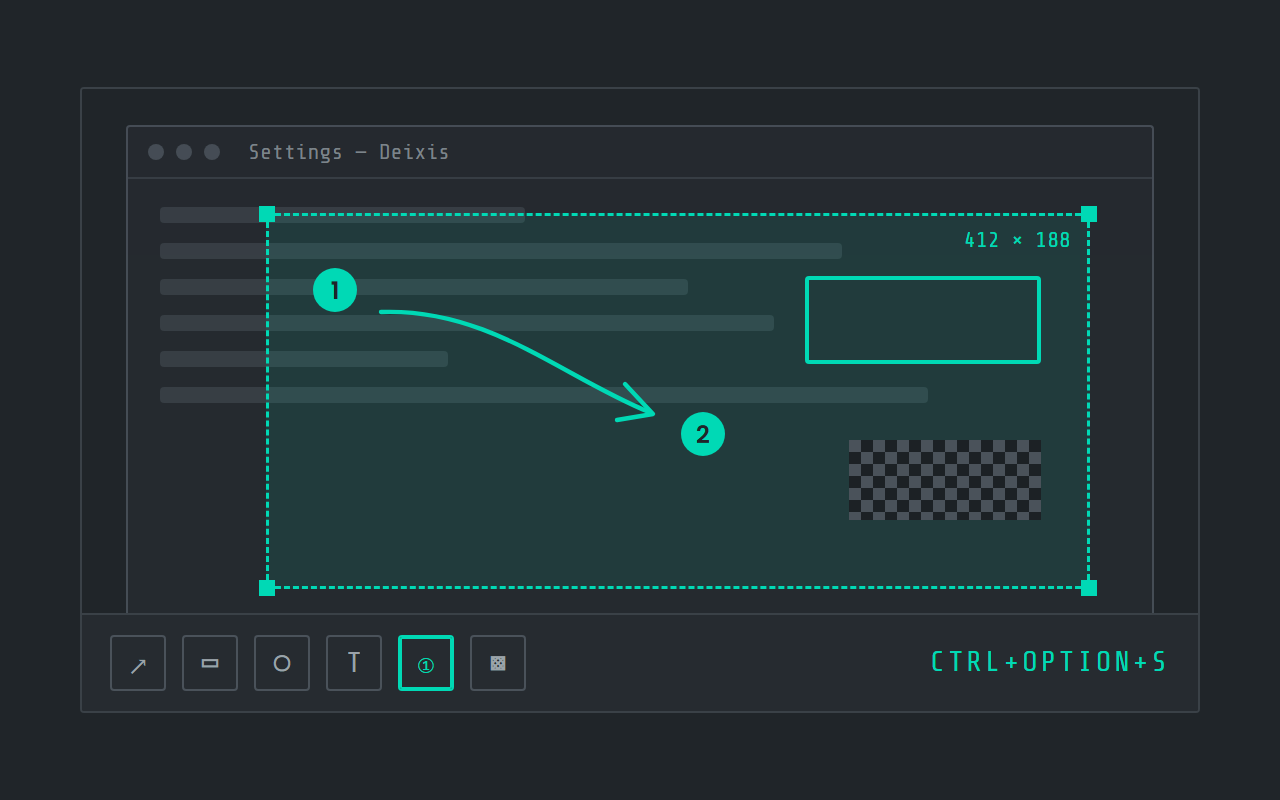
Screen grabs, annotated
Freeze the screen at the keypress, drag a region, add arrows, boxes, text and numbered steps, and pixelate what is private. Saved as a PNG in a folder you own.
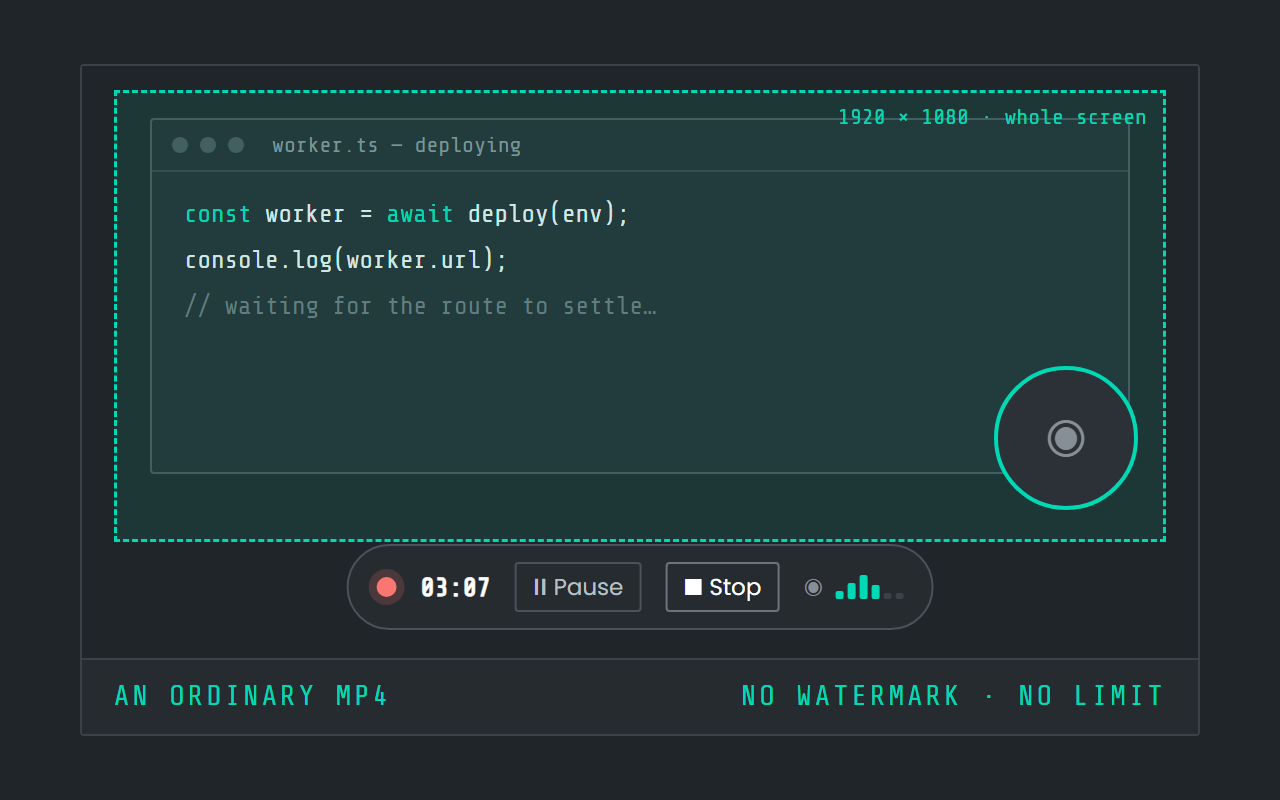
Screen recording
Record the screen, pause when you need to, and stop. The video is a file in a folder on your Mac, not in somebody else's cloud.
Field by field
The same voice, punctuated for wherever you are in Terminal and iTerm2
Deixis knows which app and which field your words are going into — the name of the app and the name of the control, never the window title and never what is on your screen. A prompt, a message and a commit line therefore come out differently. Here is the shell prompt in a Terminal tab or an iTerm2 pane, kind by kind.
| Where you are | What you say | What Deixis types |
|---|---|---|
| A prompt to a coding agentthe input line of Claude Code, Codex or another agent running in a Terminal window or an iTerm2 pane | “the upload test fails on the second run um i think it's reusing the session cookie can you find where that gets cached and clear it between runs without touching the fixtures” | The upload test fails on the second run. I think it's reusing the session cookie. Can you find where that gets cached and clear it between runs, without touching the fixtures?A prompt is prose, and it is where most of the words typed into a terminal now go. The filler goes, the run-on becomes sentences, and the question gets the question mark you never said. |
| A commit messagethe message after git commit -m, at the zsh prompt | “um move the upload progress into the swift you eye view” | Move the upload progress into the SwiftUI view.One line in your dictionary spells SwiftUI the way Apple does, fixed on this Mac before anything is sent anywhere. A short line gets a capital and a full stop and is otherwise left as you said it. |
| A comment in a scripta line after the # in a shell script open in nano or vim, inside the window | “skip the cache here because the fixture changes on every run” | Skip the cache here because the fixture changes on every run.A comment is one sentence, so it is punctuated as one and nothing is reworded. The # in front of it is yours to type. |
| A long message body or heredoca heredoc, or the commit body git opens in your editor | “this moves the thumbnail work off the main thread so scrolling doesn't stutter on a big library uh it also keeps the old cache folder working for anyone who hasn't migrated yet” | This moves the thumbnail work off the main thread, so scrolling doesn't stutter on a big library. It also keeps the old cache folder working for anyone who hasn't migrated yet.Said in one breath, it comes back as sentences with the comma where the sense needs one. This is the field where talking beats typing by the most. |
| An answer to a question on screenthe question a setup script, an installer or an agent stops on | “no keep the existing config and carry on” | No, keep the existing config and carry on.A short reply is punctuated as a short reply. Nothing is added, expanded or reworded. |
Terminal and iTerm2 facts from terminal-guide, zsh, terminal-editing, iterm2, iterm2-features, iterm2-menus, iterm2-ai, iterm2-claude-code and mac-dictation, read on 27 September 2026. Everything about Deixis on this page is from its README for the current release.
Worth knowing about Terminal and iTerm2
- Apple describes Terminal as "an app for advanced users and developers that lets you communicate with the Mac operating system using a command line interface (CLI)", with your commands "executed by a shell" — its guide names both BASH and ZSH.
- Apple's support page on shells says: "Starting with macOS 10.15, your Mac uses zsh as the default login shell and interactive shell." Deixis does not mind which shell it is: it types at the caret, and the shell reads the words as if you had typed them.
- Terminal's own guide lists the ways to fix a line before you press Return: the arrow keys, Delete or Control-H, Control-U to erase the whole line, Control-K to erase from the cursor to the end, and holding Option while you use the mouse or trackpad to move the cursor. A dictated sentence you want back is one Control-U away.
- "iTerm2 is a replacement for Terminal and the successor to iTerm." It is free, "licensed under GPL v2", and "works on Macs with macOS 10.14 or newer".
- iTerm2's split panes "Divide a tab up into multiple panes, each one showing a different session", and its hotkey window "brings iTerm2 to the foreground when you're in another application". Both are just more places for the caret to be.
- iTerm2's Composer is "a text area that you can edit using native macOS keystrokes. This is convenient for preparing complex inputs." Auto Composer goes further: it "Replaces the shell prompt with a macOS native text editing control", and needs Shell Integration installed to work.
- iTerm2's AI features are candid about what they send. They need your own key — "users must provide their own API keys" — and the Check Terminal State permission "exposes information about the linked terminal to AI, including the current directory, user shell, the current or last command and its exit status", and View Contents "exposes the contents of the linked session to AI, including your command history", with the visible screen added to each message when it is set to provide contents automatically. AI suggestions in the Composer send what you have entered, and are "disabled by default because it is not very privacy-friendly."
- iTerm2 has a Claude Code integration: "iTerm2 shows each Claude session's state (working, waiting, or idle) in the Session Status tool". It watches the agent; it does not take your prompt by voice.
- macOS has Dictation built in, and Apple says "With Dictation, you can speak to enter text anywhere you can type it." On a Mac with Apple silicon you can keep typing while you speak, and it "stops automatically when no speech is detected for 30 seconds."
- Where Apple's Dictation is processed is something to check rather than a given: its guide says you can check Keyboard settings "to see whether your voice inputs and transcripts for general text Dictation" are "processed on your device and not sent to Siri servers", and it leaves dictating into a search box out of that. It also says Dictation "is not available in all languages or regions".
Five minutes
Setting it up
About five minutes, and nothing at all changes inside Terminal or iTerm2.
Install, allow, download
Deixis for the Mac is a notarized disk image: open it and drag Deixis to Applications. The first launch asks you to press Download once for the speech model, which is checked against its published size and hash before it is kept. Until it has finished there is no model, and dictation tells you so rather than failing quietly.
The first time you dictate, macOS asks for two permissions: Accessibility and the microphone. Grant both in System Settings → Privacy & Security. Neither terminal needs anything from you.
The chord
Hold Ctrl+Option, speak, release. That is the whole gesture, and at a prompt it pairs well with a
habit: say the sentence, then type whatever has symbols in it. Double-tap the chord for free mode,
the one to use for a long agent prompt you are still working out. Hold it a moment and a palette of
modes appears above the listening pill, with a letter each — S for a grab, V for a screen
recording.
If Ctrl+Option clashes with a key binding you rely on, Settings → Hotkey captures a new chord as
you press it.
In iTerm2, the Composer is worth knowing about. Its documentation calls it "a text area that you can edit using native macOS keystrokes", which makes it a comfortable place to dictate something long, read it over and fix a word before it goes to the shell.
Teach it your words
The one accuracy improvement that costs nothing in speed. Open the Dictionary window and add the names your work is full of: a library, a service, a colleague's surname in a commit trailer. Words to expect help the recogniser listen for them; fixes correct a name it keeps mishearing, every time, and there is no limit on how many you keep. Of the five vocabulary packs that ship, software development is on from the start.
Decide what may leave, once
Settings → Cleanup is the only privacy decision here, and the default is the quiet one. Rules tidy your words on the Mac, and a language model is asked only when you have set one up and either asked for a transform or dictated a long stretch with no punctuation. Choose Never and dictation calls no model at all. Your own provider key makes the cloud cleanup free; Pro, at $49 a year, is the same cleanup with no key to get and nothing to set up. Whatever you choose, audio is not part of it.
Before you ask
Questions people search for
Can I dictate into Terminal on a Mac?
Yes. Deixis types wherever the caret is, and a shell prompt is a caret like any other — in a Terminal tab, an iTerm2 split pane, its hotkey window or its Composer. Prose is where it shines: an agent prompt, a commit message, a heredoc. Commands full of flags are still quicker typed.
macOS has Dictation built in. Why use Deixis in a terminal?
Apple's Dictation deserves credit: it is built in, Apple says it works "anywhere you can type", and on Apple silicon you can keep typing while you speak. The difference is where your voice goes. Apple's own guide says you can check Keyboard settings to see whether general dictation is processed on your device and not sent to Siri servers, which makes it something to look up rather than a given. Deixis recognises speech on your Mac every time, adds your own dictionary, and is a key you hold rather than a mode that stops after 30 seconds of silence.
Does it work with Claude Code, Codex and other agents?
Yes, in the sense that matters: it types into their input line like any other field, so a three-paragraph prompt is something you say rather than something you compose. It does not integrate with any agent or read its replies. iTerm2's own Claude Code integration shows each session's state — working, waiting or idle — and the two sit side by side without knowing about each other.
Does Deixis send my terminal output anywhere?
No. Audio never leaves your Mac. If you set up cloud cleanup, what goes is the text you dictated, your vocabulary, the name of the app and field, and what you last dictated into that field — not your scrollback, not a screenshot and not the window title. iTerm2's AI features are candid that they can send the terminal's state or its visible screen when you allow it; Deixis has no such setting.
Will it work offline?
Completely. With no cleanup destination set, dictation, free mode, grabs and screen recording all run with the network off. A fresh install makes two calls on its own — the update check at launch, and a check for an announcement from us when the Settings window opens — and both send nothing but the request.
Do I need an account or a subscription?
No. Nothing Deixis runs on your Mac is metered or asks you to log in, so there is nothing between you and the prompt. The one optional extra is a cloud model to tidy longer prompts: free on your own provider key, or $49 a year as Pro if you would rather not get one.
Keep reading
Related pages
How to type by voice in any app on a Mac, with the speech recognised on the Mac itself
How to type by voice in any app on a Mac: hold Ctrl+Option, speak, let go. Speech recognition runs on your Mac, free and with no account.
Dictation on a Mac, compared with Deixis
MacWhisper, Superwhisper, VoiceInk, Wispr Flow and Apple Dictation, set beside Deixis on a Mac: where speech is recognised, what leaves, the price.
Voice dictation for Obsidian on a Mac
Hold Ctrl+Option and talk into any Obsidian note on your Mac. No plugin, speech recognised on the Mac itself, and Markdown notes you own. Free.
Dictation for Slack on a Mac
Hold Ctrl+Option and speak into Slack on your Mac: replies, threads, DMs and canvases. Speech recognised on the Mac, with no account and no admin.
Dictation for Claude Code on a Mac
Hold Ctrl+Option and speak your Claude Code prompt in Terminal, iTerm2 or your editor. Recognised on your Mac, audio never leaves it, no account.
Dictation for Cursor on a Mac
Hold Ctrl+Option and speak into the Cursor agent prompt, a rules file or the terminal pane. Recognised on your Mac, no account, free.

Hold a key. Speak. Keep working.
Deixis is free, needs no account, and runs on your own device. Everything on this page is in the current release.
v1.2.2 · 64‑bit Windows 10/11 · macOS 13 on Apple silicon · 51 MB · nothing else to install · also for Windows
Facts about Terminal and iTerm2 checked on 2026-09-27 against support.apple.com. Deixis facts are from its README for the current release. Something out of date? Tell us.