Dictation for Slack on a Mac
A day in Slack is mostly explaining things. Why the build is red, whether the release can wait, what was decided in the call and why. It is the most wordy part of the job, nearly all of it prose, and the longest replies are the ones that sit half-written while you get on with something else. Said out loud, they take a fraction of the time they take to type.
Deixis is voice input for that. On your Mac, hold Ctrl+Option, say the reply, let go, and clean
punctuated text lands in the message box you were already in, with your clipboard handed back as you
left it. The speech is recognised on the Mac, the audio never leaves it, and there is no account to
make.
Deixis is not a Slack app, a bot or an integration, so there is nothing for a workspace admin to approve and nothing that reads your channels. It types at the caret of whatever has focus: the Slack desktop app, Slack in a browser tab, and every other app on the Mac.
Why Deixis
What it gives you in Slack, and what it will not do
Why Deixis in Slack
- A reply comes out as a reply. Deixis knows it is typing into Slack and which box it is in, and a cleanup model is told both along with your words. So "yeah that's fine ship it after the migration lands" stays one line in a channel, while the same voice explaining a bug in a thread comes out as sentences. With nothing set up, rules on your Mac do the tidying and nothing is sent.
- The thread reply you keep putting off. Slack's own guidance is to take a longer discussion into a thread, which is a polite way of saying somebody has to write it. Talking it through is faster than composing it, and you think better out loud than you type.
- Nothing to install into the workspace. No app to add, no bot to invite, no permission for an admin to review. Deixis works in Slack the way your keyboard does, which also means it works the same in every workspace you are signed in to.
- Your voice stays on the Mac. Recognition runs inside Deixis on your own Mac, and the recording and transcript stay there under every setting, with no telemetry. Slack's own dictation, in the Slackbot prompt, does not say where its audio is transcribed. With Deixis the answer is always the same: on your Mac.
- A screenshot with the customer's name hidden.
Ctrl+Option+Sfreezes the screen and lets you drag a region, then mark it up with arrows, boxes, numbered steps and a pixelate tool for whatever should not be in a channel. Copy puts the finished image on the clipboard, ready to paste into the message box. - Talk and point for the message that needs both. Double-tap
Ctrl+Optionfor free mode, describe the problem, and tap the chord to grab the region that shows it or take the text you have selected. You get one note with the explanation and the evidence in order, pasted where you finish. - Show it instead of writing it.
Ctrl+Option+Vrecords the screen to a video file on your Mac, with a small bar showing it is rolling. Stop it with the same chord and attach the file to the message. - It learns your team's words. Product names, service names, the colleague whose surname it keeps mangling: add them in the Dictionary window and they are fixed on your Mac, every time, before anything is sent anywhere.
- Free to try on one reply. Dictation, the dictionary, free mode, grabs and screen recording cost nothing on a Mac and sit behind no account, so finding out whether you like talking to your team costs nothing either.
What it will not do
- It does not know your channels, your people or your emoji. Saying "tell the platform channel" types those words. It will not find the channel, @-mention the right person or pick a reaction.
- It does not read the conversation. Deixis never sees the message you are answering, so it cannot draft the answer for you. You still have to say what you mean.
- No huddle notes. On a Mac, Deixis dictates; it does not record or transcribe a call. Slack's own AI huddle notes are, by its help pages, a paid-plan feature.
- No palette buttons or webhooks on a Mac. On Windows, a button can file the ticket you just described and type its key back into the message. That is not on the Mac yet.
- English only. The speech model is English. Slack's Slackbot dictation works with many languages while being optimised for English; if you write to your team in another language, that one is ahead of ours.
- It will not transcribe a clip. Deixis transcribes what it records itself. For a clip somebody posted, Slack's own Generate transcript button is the tool.
- It is not a keyboard replacement. Code blocks, @-mentions and slash commands are quicker typed. Deixis is for the sentences, which are most of what you send.
What you get
More than dictation, on your Mac.
Hold Ctrl+Option and speak, or press a letter while you hold it: free mode, a grab, a screen recording. All of it on your Mac, all of it free, none of it behind an account.
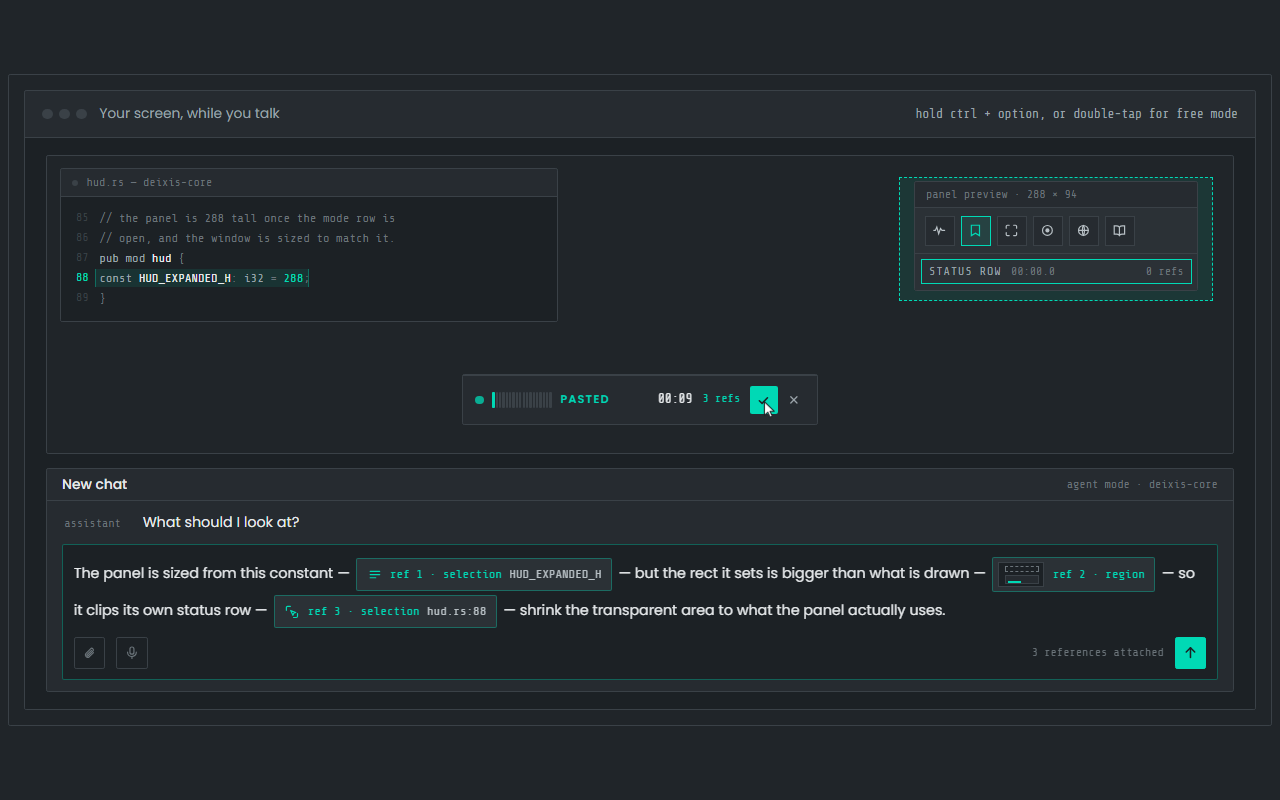
Dictation, where your cursor is
Hold Ctrl+Option, speak, release. Clean, punctuated text lands in whatever app has focus on your Mac, with your clipboard handed back.
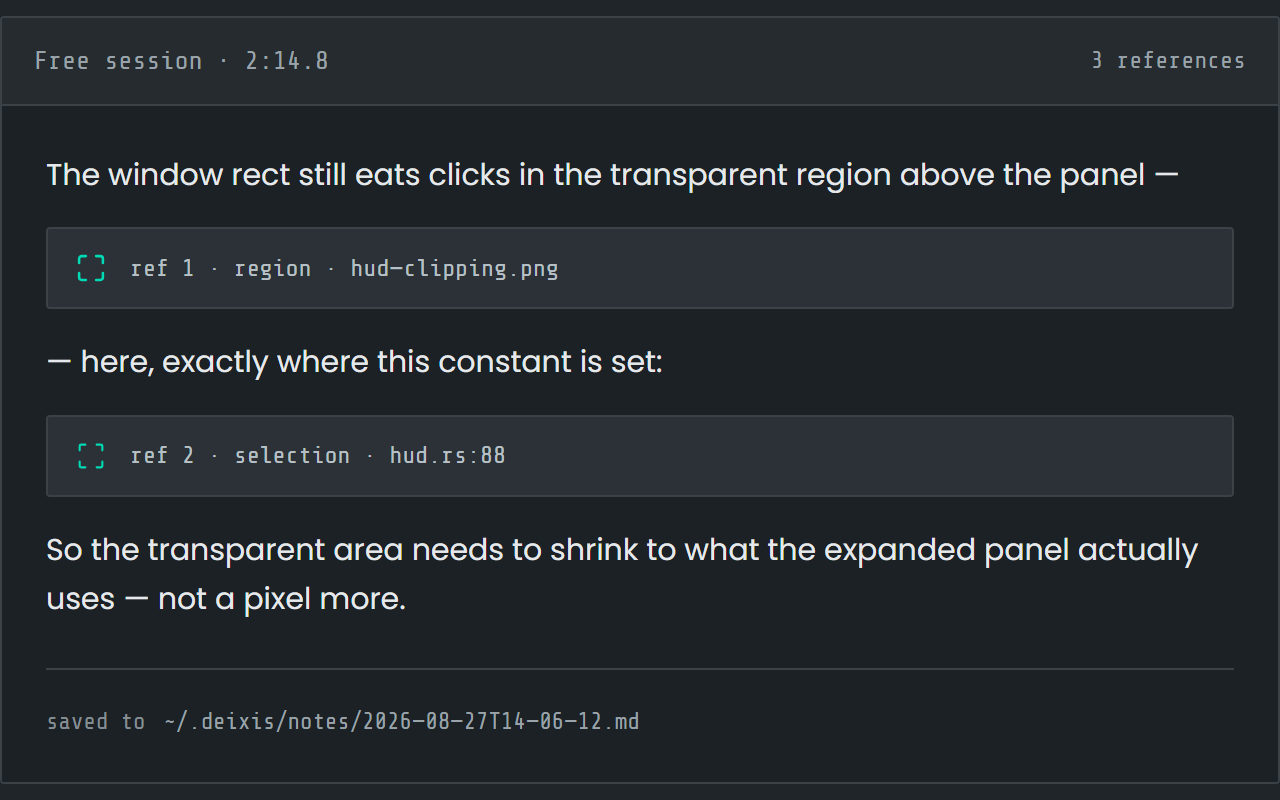
Free mode: talk and point
Double-tap the chord and narrate for as long as you like while you grab a region or take a selection. One note, what you said interleaved with what you pointed at, pasted where you finish and saved as Markdown.
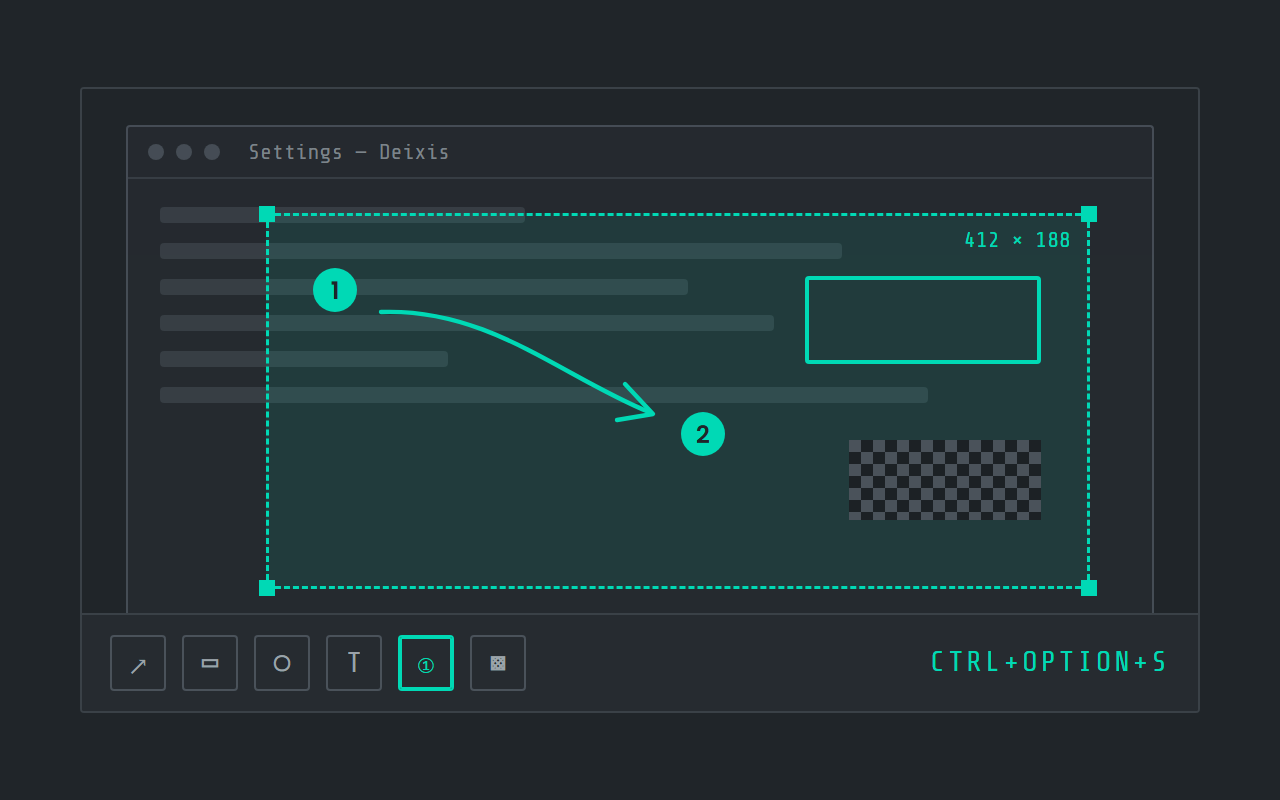
Screen grabs, annotated
Freeze the screen at the keypress, drag a region, add arrows, boxes, text and numbered steps, and pixelate what is private. Saved as a PNG in a folder you own.
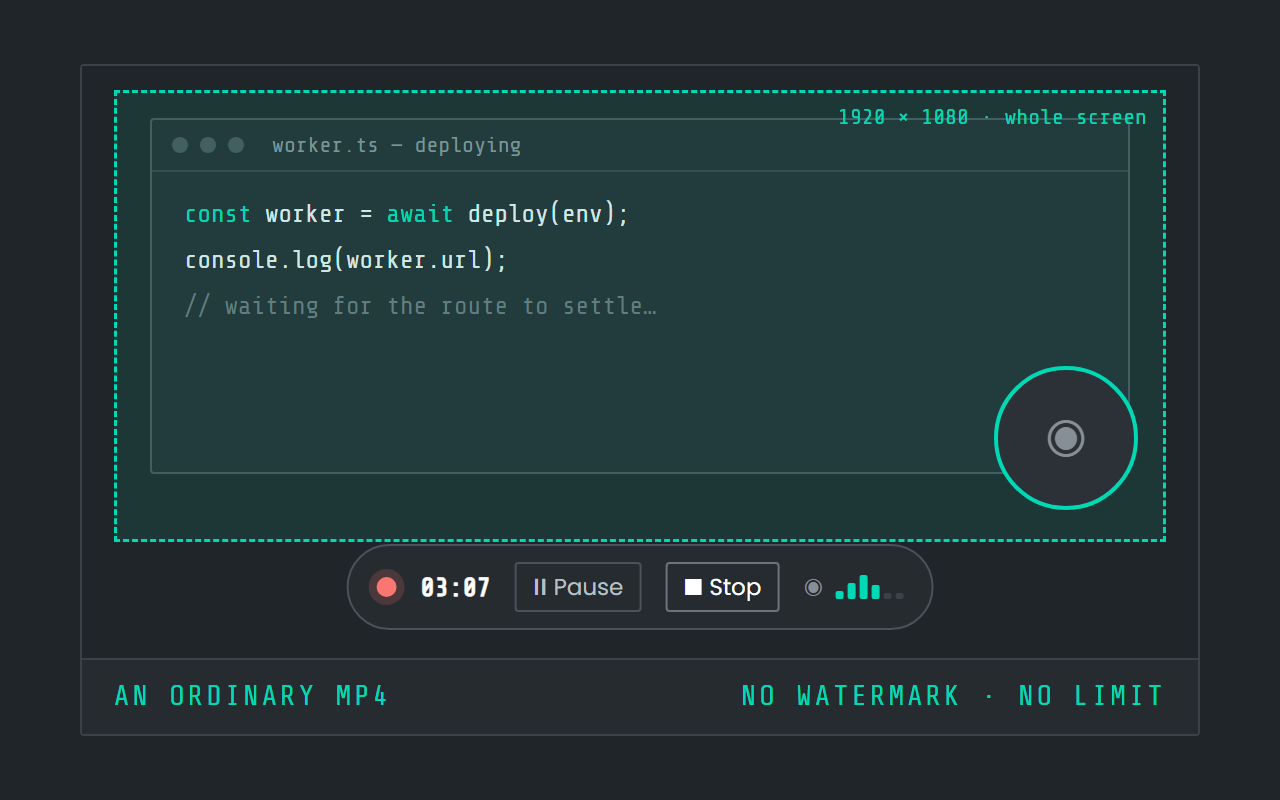
Screen recording
Record the screen, pause when you need to, and stop. The video is a file in a folder on your Mac, not in somebody else's cloud.
Field by field
The same voice, punctuated for wherever you are in Slack
Deixis knows which app and which field your words are going into — the name of the app and the name of the control, never the window title and never what is on your screen. A prompt, a message and a commit line therefore come out differently. Here is the message box, the thread and the canvas, kind by kind.
| Where you are | What you say | What Deixis types |
|---|---|---|
| A quick channel replythe message box in a channel | “um yeah that's fine ship it after the migration lands” | Yeah, that's fine — ship it after the migration lands.A one-line reply stays a one-line reply. Deixis knows it is typing into a chat box, so it punctuates the sentence and stops there. |
| A long thread replythe thread reply box, under the message you are answering | “so the reason the poller is double counting is that the feed is read once on start and once on the first tick um we only noticed because the release page showed two entries the fix is to skip the first tick and i'd rather do that than cache the response” | The reason the poller is double-counting is that the feed is read once on start and once on the first tick. We only noticed because the release page showed two entries. The fix is to skip the first tick, and I'd rather do that than cache the response.The same voice, a different field. A thread reply is an explanation, so it comes out as sentences rather than one long line. |
| A direct messagea DM with one person | “can you look at the deploy before you log off no rush if it's late” | Can you look at the deploy before you log off? No rush if it's late.A question mark you did not say, because the sentence is a question. A DM reads like speech and is punctuated like speech. |
| A canvasa channel canvas, or a canvas attached to a huddle | “decisions we're moving the cleanup call off the hot path we're keeping the rules fallback and shad kin stays for the settings panel” | Decisions: we're moving the cleanup call off the hot path, we're keeping the rules fallback, and shadcn stays for the settings panel.A document field gets document punctuation — and your dictionary fixes shadcn on this machine, before anything is sent anywhere. |
| Your statusthe status field on your profile | “heads down on the release until three” | Heads down on the release until threeA short label field gets a capital and no full stop, because a status is a label rather than a sentence. |
Slack facts from downloads, threads, slackbot, clips, huddles, huddle_notes, canvas, files and status, read on 27 September 2026. Everything about Deixis on this page is from its README for the current release.
Worth knowing about Slack
- Slack's own help pages describe desktop apps for Mac, Windows and Linux and mobile apps for iOS and Android — five places your caret can be, and Deixis is a plugin for none of them. It types where the caret is.
- Threads exist so that a longer answer does not clutter the channel: Slack's guidance is to reply in a thread to "discuss a topic in more detail", with a box you can tick to send the reply back to the channel as well. The short reply and the long explanation are two different fields, a click apart.
- Slack has voice of its own, in one specific place: its Slackbot article says you can "tap the microphone icon to dictate your prompt instead", that dictation "works with all Slack supported languages and many others, though it's currently optimized for English", and that "Dictated messages are transcribed, but audio data is not stored". That is the assistant's prompt box, not the channel message box, and the page does not say where the audio is transcribed.
- Audio and video clips are the closest thing Slack has to talking into a channel: up to five minutes, available on all plans, playable by anyone in the channel or DM. They are not transcribed automatically — you press Generate transcript on the clip afterwards — and closed captions are available for all video clips.
- Huddles are calls, not dictation. On the free plan a huddle is two people; paid plans take up to 50, with 25 on video. Live captions are not saved once the huddle ends and are English only, and each huddle carries a canvas for notes.
- Slack's AI huddle notes — the feature that writes the call up and embeds a transcript in the notes canvas — are "available on paid plans", and the transcript does not show up in search results.
- Canvases are "surfaces built into Slack where members can create and share fully-formatted content". Channel and DM canvases are on every plan; standalone canvases are a paid-plan feature.
- A status is a field too. Slack's own page says a status can be set to clear itself with "Remove status after…", and that if you pick no emoji a speech balloon is used — so the only part that is yours to write is the words.
- Most Slack messages that matter carry a picture: you can drag up to ten files into the message box at once, add a message alongside them, and write a description on an image.
Five minutes
Setting it up
About five minutes, and nothing changes in Slack or in your workspace.
Install, then two permissions
Open the notarized disk image and drag Deixis into Applications; it needs an Apple silicon Mac on macOS 13 or later. On first launch, one Download button fetches the speech model, which is checked before it is kept. The first time you dictate, macOS asks for Accessibility and microphone permission. Grant both in System Settings → Privacy & Security and you are done.
The chord
Hold Ctrl+Option, speak, release, with the caret in the message box. For a long thread reply,
double-tap instead: free mode keeps listening until you double-tap again, and a screenshot grabbed
mid-sentence joins the note at the point you grabbed it. Hold the chord a moment and a small palette
offers a letter per mode, S for a grab and V for a screen recording. If Ctrl+Option clashes
with a shortcut of yours, Settings → Hotkey captures another.
Teach it your words
Open the Dictionary window and add the names that matter: your products, your services, the people you write to every day. A fix for a name it keeps mishearing applies every time, and there is no limit on how many you keep. Five vocabulary packs ship: software development is on from the start, and Business & product is a switch away if your channels talk more roadmap than code.
Decide what may leave
Settings → Cleanup is the only privacy decision. By default, rules on your Mac tidy what you said and nothing leaves; a language model is asked only if you have set one up, and then only for a transform you asked for ("make this a bullet list" before a status update) or a long stretch with no punctuation. What that model is told is your words, your vocabulary, what you last dictated into that box, and which app and box it is; never the conversation around it, and never the audio.
Before you ask
Questions people search for
Does Slack have dictation of its own?
In one place. Slack's Slackbot page describes a microphone icon for dictating a prompt to the assistant, and says dictated messages are transcribed but the audio is not stored. It does not say where that transcription happens, and it is the assistant's prompt box, not the message box you answer your team in. Deixis types into every box, and recognises the speech on your Mac.
Mac Dictation already types into Slack. Why Deixis?
It does, and being built in is a real advantage. What it lacks for a team chat is your team's vocabulary: Deixis adds a dictionary of your product and people names, cleanup that can tell a channel reply from a thread, and grabs and recordings on the same chord. On privacy, Apple's guide sends you to Keyboard settings to see whether your dictation is processed on the Mac or by Siri servers; Deixis never sends your voice anywhere, whatever the setting.
Can Deixis take notes in a huddle on a Mac?
Not on a Mac. Meeting recording and transcription is on Windows and on the Android app today. On a Mac, Deixis is dictation, free mode, grabs and screen recording.
What about audio clips?
A clip is you talking, posted for others to play; Slack does not transcribe it until someone presses Generate transcript. Deixis gives you text in the message box, which is searchable, quotable and quicker to read than a clip is to play.
Does it work in the desktop app and in the browser?
Both. Deixis types at the caret of whatever has focus, so whether Slack is the desktop app or a browser tab makes no difference to it, and it is a plugin for neither. The same chord works in your editor, your mail and your ticket tracker.
Do I need an account, or an admin's approval?
Neither. Nothing is installed into the workspace, so there is nothing for an admin to review, and Deixis itself has no login for anything it runs on your Mac. If you want a cloud model tidying long replies, bring your own provider key for free, or pay $49 a year for Pro and skip the setup.
Keep reading
Related pages
How to type by voice in any app on a Mac, with the speech recognised on the Mac itself
How to type by voice in any app on a Mac: hold Ctrl+Option, speak, let go. Speech recognition runs on your Mac, free and with no account.
Dictation on a Mac, compared with Deixis
MacWhisper, Superwhisper, VoiceInk, Wispr Flow and Apple Dictation, set beside Deixis on a Mac: where speech is recognised, what leaves, the price.
Dictation for Claude Code on a Mac
Hold Ctrl+Option and speak your Claude Code prompt in Terminal, iTerm2 or your editor. Recognised on your Mac, audio never leaves it, no account.
Dictation for Cursor on a Mac
Hold Ctrl+Option and speak into the Cursor agent prompt, a rules file or the terminal pane. Recognised on your Mac, no account, free.
Dictation for VS Code on a Mac
Hold Ctrl+Option to dictate into VS Code chat, comments and the terminal, then into every other app on your Mac. Recognised on the Mac, no sign-in.
Dictation for Terminal and iTerm2 on a Mac
Hold Ctrl+Option and speak into Terminal or iTerm2 on your Mac. Agent prompts, commit messages and heredocs, recognised on the Mac, with no account.

Hold a key. Speak. Keep working.
Deixis is free, needs no account, and runs on your own device. Everything on this page is in the current release.
v1.2.2 · 64‑bit Windows 10/11 · macOS 13 on Apple silicon · 51 MB · nothing else to install · also for Windows